
Synthesia Review 2026: Introduction
Synthesia is one of the most established AI video creation platforms focused on avatar-based videos generated from text. Instead of producing cinematic scenes or abstract visuals, Synthesia specializes in creating professional talking-head videos using realistic AI presenters that deliver scripts in multiple languages.
The main problem Synthesia solves is simple but valuable: producing clear, consistent, human-like video content without cameras, studios, actors, or repeated reshoots. This makes it especially attractive for businesses, educators, and teams that need scalable video communication.
However, Synthesia is not designed for cinematic storytelling, creative experimentation, or social-media-first content. This review breaks down what Synthesia actually does well, where it falls short, and who should realistically be using it in 2026.
What Synthesia AI Video Tool Does Best
Synthesia excels at script-to-avatar video generation for professional and informational content. Its strongest use case is creating videos where clarity, consistency, and scalability matter more than creativity or visual spectacle.
The platform is particularly effective for:
• Corporate training videos
• Internal communications
• Product walkthroughs
• Educational explainers
• Multilingual presentations
Unlike text-to-video tools like Sora or Google Veo 3, Synthesia does not attempt to generate cinematic scenes or complex motion. Its competitive advantage is reliability: predictable output, consistent avatars, and clean audio delivery.
For teams that need to produce dozens or hundreds of similar videos with minor script changes, Synthesia outperforms most generative video tools in efficiency.
Synthesia Review: Key Features Explained
AI Avatars
Synthesia offers a library of professional AI avatars that simulate real human presenters. These avatars maintain consistent appearance, facial expressions, and eye contact across videos, which is critical for corporate branding.
Users can also create custom avatars, trained on real people, allowing organizations to scale communication using a single recognizable face.
Text-to-Speech in Multiple Languages
The platform supports dozens of languages and accents, making it highly effective for global teams. Scripts can be translated and reused across regions without recording new voiceovers.
This feature alone significantly reduces localization costs for training and onboarding materials.
Script-Based Video Editing
Synthesia uses a text-first workflow. You edit the script, not the timeline. This eliminates traditional video editing complexity and allows non-technical users to update videos quickly.
Changes to scripts automatically regenerate the video, avoiding reshoots or re-edits.
Templates and Layouts
Users can choose from presentation-style templates, background designs, and on-screen text layouts. While visually conservative, these templates are optimized for clarity and professionalism.
Enterprise Security and Governance
Synthesia includes enterprise-grade controls such as brand management, access permissions, and compliance features. This makes it suitable for regulated industries where data handling matters.
Synthesia Pros and Cons
Pros
• Extremely easy to use
No video editing skills required. Anyone who can write a script can produce a video.
• Highly scalable for business use
Ideal for creating large volumes of consistent content.
• Strong multilingual support
Excellent for global training and communications.
• Predictable and reliable output
What you see is what you get. No random artifacts or generation failures.
• Professional perception
Avatars and layouts are designed to look corporate-friendly and trustworthy.
Cons
• Limited creative flexibility
No cinematic visuals, dynamic scenes, or storytelling variety.
• Not suitable for social media content
Videos often feel static and formal compared to modern short-form platforms.
• High pricing barrier
Not affordable for hobbyists or solo creators.
• Avatar realism still has limits
While polished, avatars can still feel artificial over long viewing periods.
• No true video generation
Synthesia does not generate scenes, environments, or motion beyond avatars.
Synthesia Review 2026: Who Should Use This Tool
Synthesia is built for structured communication, not creative experimentation. Its ideal users are organizations and professionals who prioritize clarity, scalability, and consistency over visual flair.
Synthesia Is Ideal For:
• Corporate teams creating standardized training and onboarding content across departments or regions.
• HR departments producing internal updates, policy explanations, and company-wide announcements.
• SaaS companies developing product tutorials, walkthroughs, and customer education modules.
• Educators and instructional designers delivering structured lessons with clear scripts and subtitles.
• Enterprises operating globally that require multilingual video communication at scale without re-recording content.
The platform is especially effective in environments where message accuracy and repeatability matter more than cinematic storytelling.
Experience level: Beginner to intermediate.
No technical editing skills, filming equipment, or creative production background are required. The script-based workflow makes video creation accessible to non-creatives and business professionals.
Synthesia Is Not Recommended For:
• YouTube creators focused on personality-driven storytelling or entertainment formats.
• TikTok, Instagram, or Shorts creators who rely on fast-paced, visually dynamic content.
• Filmmakers or visual artists seeking cinematic control, expressive performances, or advanced scene composition.
• Creators looking for experimental, stylized, or emotionally immersive visuals.
If your goal is audience growth through creativity, narrative tension, or viral engagement, Synthesia will likely feel restrictive.
But if your goal is scalable, structured communication with minimal production friction, Synthesia remains one of the strongest tools in its category.
Synthesia Pricing, Plans and Limitations
Synthesia operates on a subscription model:
• Starter plans begin around the mid-tier pricing range and include limited video minutes per month.
• Corporate and enterprise plans scale based on usage, custom avatars, and team features.
There is no true free plan, only demos or limited trials.
Key limitations:
• Video length is tied to monthly minute quotas
• Advanced features require higher-tier plans
• Custom avatars significantly increase cost
In terms of value, Synthesia makes sense only if video is a core communication tool. For occasional use, the cost is hard to justify.
Synthesia Review: Real Use Case Examples
Synthesia is designed for structured, professional communication rather than cinematic storytelling. Its strength lies in clarity, scalability, and consistency — especially in corporate and educational environments where reliability matters more than visual complexity.
Corporate Training
Synthesia is particularly effective for onboarding and internal training programs. Companies can create standardized training videos that remain consistent across departments, regions, and languages.
Instead of recording multiple trainers, organizations can:
- Deliver uniform messaging worldwide
- Update modules quickly when policies change
- Maintain consistent branding and tone
- Translate content into multiple languages using the same script
This ensures that every employee receives the same information, reducing variability and compliance risks.
Internal Announcements
Leadership communication often requires coordination, scheduling, and production resources. With Synthesia, executive messages can be delivered through a professional avatar without organizing live recordings or video shoots.
This is especially useful for:
- Quarterly updates
- Policy changes
- Company-wide announcements
- International communications
It simplifies logistics while maintaining a polished, formal presentation style.
Product Tutorials
Synthesia works well for step-by-step product walkthroughs, particularly in SaaS or technical industries. Instead of recording voiceovers and presenters manually, teams can input scripts and generate structured tutorial videos quickly.
Benefits include:
- Clear, scripted explanations
- Consistent tone across modules
- Easy updates when product features change
- Subtitles for accessibility and multilingual audiences
This makes it efficient for knowledge bases, help centers, and onboarding flows.
Educational Content
For structured learning environments, Synthesia can deliver lessons supported by on-screen text, slides, and subtitles. While it may not replace interactive teaching, it provides a scalable solution for standardized instruction.
Common applications include:
- E-learning modules
- Certification programs
- Micro-learning content
- Instructional series
The format supports clarity and repetition, which are critical in educational contexts.
Compliance and Policy Updates
One of Synthesia’s strongest use cases is compliance communication. When regulations or internal policies change, companies can quickly update scripts and regenerate videos without re-filming executives or trainers.
This allows for:
- Faster rollout of policy updates
- Consistent legal messaging
- Reduced production costs
- Version control across regions
In environments where clarity, speed, and consistency are essential, Synthesia provides a practical and scalable solution.
Comparison: Top 3 AI Video Creation Tools
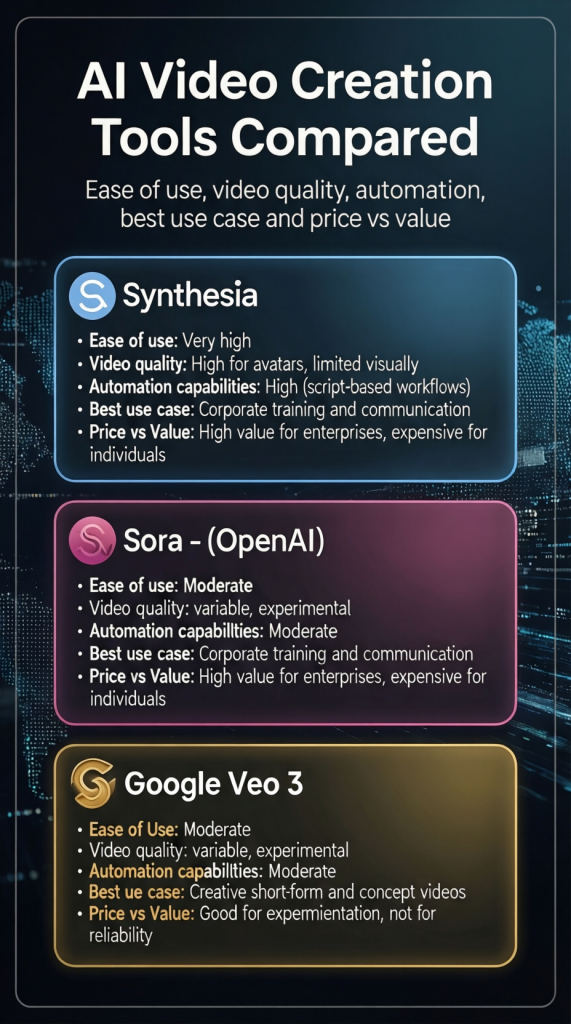
| Tool | Ease of Use | Video Quality | Automation Capabilities | Best Use Case | Price vs Value |
|---|---|---|---|---|---|
| Synthesia | Very high | High for avatars, limited visually | High (script-based workflows) | Corporate training and communication | High value for enterprises, expensive for individuals |
| Sora (OpenAI) | Moderate | Variable, experimental | Moderate | Creative short-form and concept videos | Good for experimentation, not for reliability |
| Google Veo 3 | Moderate to complex | Very high for short cinematic clips | Moderate | High-quality social and narrative visuals | Premium, justified for advanced creators |
Synthesia Review 2026 Infographic:
Synthesia Review: Final Verdict
Synthesia is not a flashy AI video generator — and that is precisely why it continues to perform well in professional environments. In a market crowded with cinematic AI demos and viral social clips, Synthesia stays focused on one thing: structured, scalable communication.
And it does that exceptionally well.
In 2026, it remains one of the most reliable AI video platforms for businesses that value clarity, repeatability, and operational efficiency over visual spectacle. It is not trying to compete with cinematic AI generators. It is not designed for artistic experimentation. It is built for organizations that need to deliver consistent messages across teams, regions, and languages.
That focus is its competitive advantage.
If your primary goal is creativity, emotional storytelling, or growing a social media audience, Synthesia will likely feel restrictive. The avatar-centered format and controlled visual environment are not optimized for dynamic entertainment content. You will not find advanced cinematic camera movement or highly expressive character performances.
But that limitation is intentional.
Where Synthesia excels is in environments where structure matters more than style:
- Corporate training programs
- Internal communication
- Compliance updates
- Product onboarding
- Educational modules
The platform reduces logistical friction dramatically. No cameras. No studios. No reshoots. No scheduling executives for video recordings. Script in, video out. Update the script, regenerate instantly.
For enterprises and structured teams, this efficiency compounds over time. The value is not in visual flair — it is in operational scalability.
That said, the pricing structure makes more sense for organizations than for solo creators. For individuals experimenting with content or building personal brands, the investment may feel disproportionate compared to more flexible AI tools.
Synthesia is not hype-driven. It does not promise cinematic breakthroughs. It is not positioned as a creative playground.
It is a focused, professional-grade communication system.
No magic.
No overpromising.
Just a specialized tool that consistently delivers within its lane.
And in a landscape filled with noise, that kind of clarity is rare.
Author’s Note:I research and evaluate AI video tools from the perspective of a digital entrepreneur who builds and monetizes content sites across multiple niches. My focus is always practical: does this tool fit into a real production workflow, what does it actually cost at scale, and does it deliver value for creators building long-term online assets. This review reflects that analytical approach, combined with direct exploration of the platform.