

How to Combine AI Tools and Human Editing for High-Retention Videos
AI tools have dramatically lowered the barrier to video creation. Today, anyone can generate scripts, visuals, voiceovers, and even full videos in minutes. Yet despite this accessibility, a persistent problem remains: most AI-generated videos struggle to удерж retention. Viewers click, watch a few seconds, and leave.
This is not a platform issue, nor is it a viewer attention problem. The real issue lies in how AI is being used. While artificial intelligence excels at speed and structure, it lacks judgment, nuance, and narrative instinct. Human editors, on the other hand, understand pacing, emotion, and context—but they cannot compete with AI at scale.
High-retention video content is not created by choosing between AI or humans. It is created by combining both intelligently.
This article explains how to integrate AI tools and human editing into a single, sustainable workflow that produces videos people actually finish watching. We will break down where AI adds value, where it fails, how human intervention changes outcomes, and how smart creators design systems that scale without sacrificing quality.
The goal is not automation for its own sake, but retention-driven video production that works across platforms.
AI Tools Context and Relevance:
Why Retention Suffers in AI-Generated Videos
Retention has become one of the most important performance signals across video platforms. Whether on YouTube, short-form feeds, or emerging video discovery systems, platforms prioritize content that keeps viewers watching.
AI-generated videos often fail this test for several reasons.
First, AI optimizes for completion, not engagement. Most tools are designed to generate “a video” from start to finish, following predictable patterns. These patterns may look correct structurally, but they feel flat to viewers.
Second, AI lacks audience awareness. It does not truly understand why a viewer clicked, what emotional state they are in, or what pacing decisions will maintain interest. As a result, hooks are generic, transitions are abrupt or repetitive, and emphasis is poorly timed.
Third, over-automation removes friction that is actually necessary for quality. When creators remove themselves entirely from the process, they lose the opportunity to make judgment calls that improve flow and clarity.
Human editing compensates for these weaknesses, but manual workflows alone are slow, expensive, and difficult to scale. This is where combination becomes essential.
The highest-performing AI-assisted video creators are not fully automated. They are system designers who understand where human input matters most.
Understanding the Strengths and Limits of AI Tools and Human Editing in Video Creation
To combine AI and human editing effectively, it is important to understand what AI does well—and what it does poorly.
Where AI Tools Excel
AI tools are exceptionally strong in areas that require repetition, structure, and speed:
- Script drafting and outlining
- Idea generation and topic expansion
- B-roll selection and assembly
- Captioning and transcription
- Voiceover generation
- Basic scene sequencing
These tasks benefit from automation because they are time-consuming but not judgment-heavy. AI can produce usable drafts that give creators a strong starting point.
Where AI Falls Short
AI struggles most in areas tied to human perception:
- Emotional pacing
- Natural emphasis and pauses
- Contextual humor or seriousness
- Cultural nuance
- Story tension and release
- Subtle visual rhythm
These elements are difficult to formalize, which is why fully automated videos often feel “correct” but not compelling.
Understanding this division allows creators to assign tasks strategically instead of expecting AI to replace human decision-making.

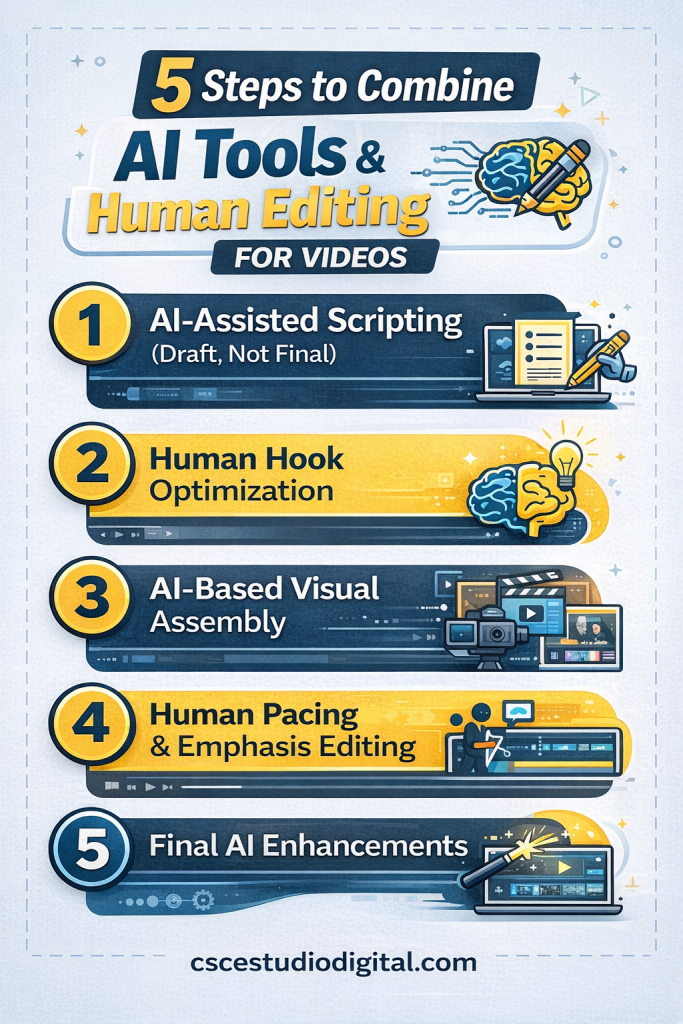
The Hybrid Workflow: AI-Assisted Creation With Human Control
High-retention video workflows follow a hybrid model. AI handles production volume. Humans handle quality control and emotional logic.
Below is a framework used by many successful faceless and semi-automated video channels.
Step 1: AI-Assisted Scripting (Draft, Not Final)
AI should generate a first-pass script based on a clear intent. This draft is not meant to be published as-is. It is a structural foundation.
At this stage, the goal is:
- Logical flow
- Coverage of key points
- Clear beginning, middle, and end
The human role here is to evaluate the script for clarity and remove unnecessary filler. Most retention issues begin with weak or bloated scripts.
Step 2: Human Hook Optimization
The first 5–15 seconds of a video determine retention. AI-generated hooks are often too broad or passive.
Human editing at this stage focuses on:
- Sharpening the opening statement
- Introducing tension or curiosity
- Removing slow intros
- Clarifying the value immediately
This step alone can significantly increase average watch time.
Step 3: AI-Based Visual Assembly
Once the script is refined, AI tools can efficiently assemble visuals:
- Stock footage
- AI-generated imagery
- Automated scene changes
- On-screen text
This saves hours compared to manual editing.
However, visuals should be reviewed for relevance and pacing. AI often selects visually correct but emotionally neutral clips.
Step 4: Human Pacing and Emphasis Editing
This is where retention is either won or lost.
Human editors adjust:
- Scene duration
- Cut timing
- Emphasis points
- Pauses and breathing room
Small changes here dramatically affect how long viewers stay engaged. This cannot be reliably automated yet.
Step 5: Final AI Enhancements
After human adjustments, AI can be used again for:
- Captions and subtitles
- Audio normalization
- Export variations
- Format resizing
This keeps the workflow efficient without compromising quality.
Common Mistakes When Combining AI Tools and Human Editing
Hybrid workflows — mixing AI generation with human refinement — can be incredibly powerful. When done right, they create speed and quality. When done wrong, they create chaos at scale.
Many creators adopt AI tools with good intentions, but then undermine their own results with predictable execution mistakes. Let’s break them down clearly.
1. Over-Editing Instead of Redesigning the Workflow
One of the most common errors is trying to “fix” weak AI outputs in post-production.
If the script feels flat, pacing is awkward, or visuals don’t align properly, creators often jump straight into heavy manual editing. They trim scenes, swap clips, rewrite sections, and polish endlessly.
The real issue?
The problem started before generation.
If the prompt was vague, the structure unclear, or the intent unfocused, no amount of editing will fully solve it. Repeatedly patching weak outputs wastes time and drains creative energy.
A better approach:
- Improve prompt clarity
- Define tone and structure upfront
- Outline the video before generating
- Reduce ambiguity in instructions
Strong inputs reduce the need for excessive corrections. Fix the system — not just the symptoms.
2. Inconsistent Human Intervention
Another silent killer is inconsistency. Some videos get careful script refinement, manual pacing adjustments, and thoughtful thumbnails. Others are generated and published automatically with minimal review.
This creates uneven performance patterns:
- Inconsistent retention
- Fluctuating watch time
- Unstable engagement signals
Algorithms thrive on predictability. If quality swings dramatically between uploads, performance becomes volatile.
Consistency builds trust — with both your audience and the platform.
Establish clear rules:
- What gets edited every time?
- What gets reviewed before publishing?
- What quality standard must be met before release?
Hybrid workflows require systems. Without them, quality becomes random.
3. Scaling Too Fast
Speed is intoxicating. AI makes production easier, so creators often increase output immediately. More videos. More posts. More experiments.
But if retention metrics are unstable, scaling multiplies weaknesses. Instead of accelerating growth, you amplify underperformance.
Signs you’re scaling too early:
- Low average watch duration
- Weak hook performance
- Inconsistent click-through rates
- Audience drop-off patterns
Fix performance first. Then scale.
Optimization before expansion always wins.
4. Treating AI as a Replacement Instead of a Collaborator
This mindset mistake causes long-term decline.
When creators expect AI to fully replace creative thinking, storytelling intuition, and strategic planning, disappointment follows. Outputs feel generic. Personality fades. Engagement drops.
AI is a force multiplier — not a creative identity.
Use AI for:
- Draft generation
- Structural support
- Speed and iteration
- Production efficiency
Use human judgment for:
- Emotional tone
- Brand voice
- Story structure
- Strategic positioning
The strongest creators don’t compete with AI. They direct it.
The Bottom Line
Hybrid workflows work best when structured intentionally.
If you:
- Improve inputs instead of patching outputs
- Maintain consistent editing standards
- Scale only after stabilizing performance
- Treat AI as a collaborator
You build leverage.
If not, you build noise — faster than ever before.
Speed amplifies whatever system you have.
Make sure the system is solid first.
Practical Value: Designing a Sustainable High-Retention System
A sustainable AI-human video system is not about stacking tools. It’s about defining roles clearly.
Most creators obsess over which platform to use. The smarter question is: who is responsible for what?
When roles are undefined, chaos creeps in. When roles are structured, performance stabilizes.
Define Clear Responsibilities
In an effective hybrid system:
- AI handles volume, speed, and repetition.
Draft generation. Scene assembly. Basic formatting. Iterative variations. - Humans handle psychological leverage.
Hook strength. Emotional tone. Narrative pacing. Strategic positioning.
AI is excellent at execution. Humans are responsible for direction.
If you let AI decide structure, tone, and persuasion strategy, results become average. If you let humans handle every micro-task manually, production becomes slow and inconsistent.
Balance creates sustainability.
Build Around Retention, Not Output
High-retention systems are engineered intentionally. They are not accidental.
Retention improves when:
- Hooks are structured deliberately
- Scene transitions feel purposeful
- Information flows logically
- Pacing matches audience expectation
Viewers can sense intentional design. When pacing feels random, attention drops. When clarity is strong, watch time increases.
Algorithms reward consistency over occasional spikes.
One strong video does not build momentum. A predictable pattern of strong videos does.
Document the Workflow
If you are managing multiple formats, channels, or team members, informal processes eventually break down.
That’s why structured workflow documentation becomes powerful. Clear step-by-step production pipelines remove ambiguity. They reduce decision fatigue and prevent performance swings between uploads.
For creators who want a condensed, organized overview of this system, downloadable workflow guides can help formalize the structure. These resources are particularly useful when scaling output across multiple niches or platforms.
The goal is not complexity. The goal is repeatability.
Scale After Stabilizing
Many creators reverse the order. They scale first and optimize later.
The better sequence:
- Start small.
- Refine one workflow.
- Measure retention and engagement.
- Improve weak points.
- Then increase volume.
If retention is unstable at 3 videos per week, it will not magically improve at 10.
Scale multiplies whatever system you have — good or bad.
Guided Automation Wins
Automation is powerful. But automation without oversight erodes quality over time.
The most sustainable creators treat AI like a production assistant — not a replacement. They guide, refine, measure, and adjust continuously.
Automation works best when directed.
Retention grows when structure is intentional.
Sustainability happens when speed and strategy operate together
AI Tools and Human Editing: Conclusion
High-retention videos are not the result of better AI tools alone. They are the result of better systems.
Creators who combine AI Tools and Human Editing efficiency with human judgment produce content that feels intentional, natural, and engaging. They avoid the mechanical tone that turns viewers away and instead deliver videos that hold attention from start to finish.
The future of video creation is not fully automated, nor is it purely manual. It belongs to creators who understand where technology ends and human insight begins.
By designing hybrid workflows, you can scale production without sacrificing quality—and retention becomes a predictable outcome, not a lucky accident.