
AI Tools for Video Creation: Introduction
AI tools for video creation: Artificial intelligence is no longer a buzzword in the world of video creation. It has become a practical, powerful set of tools that democratize video production for creators of all levels. Whether you’re a YouTuber, marketer, social media creator, small business owner, or educator, AI tools for video creation can help you make better content faster and with fewer resources.
But with so many AI video tools available today, how do you choose the right one? In this article, we compare the best platforms for video creation, breaking down features, use cases, pros and cons, and how each performs in real-world content workflows.
This comparison is designed to help you make an informed choice, so you don’t waste time testing dozens of tools or end up with something that doesn’t meet your needs.
Why AI Tools Are Transforming Video Creation
Video has become the dominant content format online, driving engagement, conversions, and search visibility. Yet traditional video creation has been historically expensive, time-consuming, and technically challenging.
AI video tools are changing that paradigm by handling repetitive tasks like scene generation, narration, transitions, and editing. Instead of spending hours in editing timelines, creators can focus on story, strategy, and impact.
AI video creation tools use technologies like:
- Natural language processing (NLP)
- Computer vision
- Generative models
- Text-to-speech and voice synthesis
- Automated editing engines
These capabilities allow users to create content from text, scripts, images, or simple directives — significantly lowering the barrier to entry.
AI Tools for Video Creation: How We Selected These Platforms
There’s no shortage of AI video tools claiming to be “revolutionary.” Most aren’t. Some are impressive demos. A few are genuinely usable. Even fewer are scalable.
So instead of chasing hype, we evaluated platforms using criteria that actually matter in real-world content production — not just feature lists.
Here’s how the selection process worked:
1. Ease of Use
AI is supposed to reduce friction, not replace one complex workflow with another.
We looked at:
- Beginner accessibility.
- Learning curve length.
- Interface clarity.
- Time from idea to first export.
If a tool requires hours of tutorials just to produce a basic video, it loses points. The best platforms let new users create something usable within minutes — not days.
Because if your workflow is slower than traditional editing, what’s the point?
2. Quality of Output
Speed means nothing if the result looks cheap.
We evaluated:
- Visual polish.
- Motion smoothness.
- Narrative coherence.
- Audio synchronization.
- Overall production feel.
Does the video look “AI-generated” in a distracting way? Or does it pass as intentionally designed?
A tool can be simple and still produce strong output. The goal is not perfection — it’s professional credibility.
3. Customization & Creative Control
Templates are great — until they start limiting you.
We assessed:
- Scene-level editing flexibility.
- Control over pacing and timing.
- Voiceover adjustments.
- Branding options (logos, fonts, colors).
- Ability to refine prompts and regenerate selectively.
AI should accelerate creativity, not lock you into rigid outputs. The strongest platforms allow both automation and adjustment.
Because serious creators iterate — they don’t settle for first drafts.
4. Platform Support
Modern content isn’t one-size-fits-all. A horizontal YouTube video won’t perform the same as a vertical Reel.
We reviewed:
- Export formats and aspect ratios.
- Optimization for YouTube, TikTok, Instagram, Shorts, etc.
- Caption and subtitle integration.
- Resolution options (HD, 1080p, higher tiers).
If a platform forces you to manually reformat content for every channel, it adds friction. The best tools understand distribution realities.
5. Scalability
This is where most AI tools fail.
It’s easy to create one impressive demo video. It’s harder to produce 30 videos per month consistently.
We analyzed:
- Generation limits and credit systems.
- Rendering speed under higher volume.
- Workflow efficiency for batch production.
- Pricing sustainability at scale.
A tool that works for a hobbyist but collapses under daily production demands isn’t truly robust.
Why These Platforms Made the Cut
The tools selected aren’t perfect. None are. But they are:
- Actively developed.
- Widely adopted.
- Capable of producing real-world results.
- Practical for creators, marketers, and businesses.
We prioritized platforms that balance usability and output quality — not just experimental tech showcases.
Because in the end, this isn’t about AI novelty.
It’s about whether the tool helps you publish better content, faster, and more consistently.
That’s the standard that matters.
1. Pictory
Best for: Repurposing text content into engaging videos
Pictory stands out for turning scripts, blog posts, and written outlines into polished videos. It’s popular with content creators, educators, and marketers.
Key Features:
- Text-to-video generation
- Auto captioning
- Library of stock visuals
- Scene suggestions based on content
Pros:
- Extremely beginner-friendly
- Great for social media and YouTube
- Fast turnaround time
Cons:
- Limited customization compared to professional editors
- Not ideal for cinematic content
Best for: Blog-to-video workflows, tutorials, quick explainers
2. InVideo
Best for: Template-driven marketing and social content
InVideo uses templates to streamline video production. It’s favored by social media marketers and small businesses.
Key Features:
- Extensive template library
- Drag-and-drop interface
- Text-to-video options
- Automated transitions and audio tracks
Pros:
- Excellent template ecosystem
- Very low learning curve
- Strong social media focus
Cons:
- Templates can feel repetitive if overused
- Advanced customization is limited
Best for: Social media posts, ads, promotional videos
3. Synthesia
Best for: Human-like avatars and narrated videos
Synthesia is a leader in AI avatar video creation. It transforms scripts into talking-head videos without recording cameras.
Key Features:
- AI avatars with natural voices
- Multilingual support
- Easy script editor
Pros:
- Mimics human presenters
- Strong voice options
- Good for corporate and educational content
Cons:
- Avatars may feel less relatable for all audiences
- Higher pricing tier
Best for: Trainer videos, training content, product demos
4. Runway
Best for: Automated creative editing and effects
Runway blends creative editing tools with AI automation. It excels in fine-tuning visual elements.
Key Features:
- Background removal
- Object tracking
- Creative visual edits
- AI-assisted transitions
Pros:
- Powerful editing features
- Excellent for creators who want more control
- Integrates with traditional workflows
Cons:
- Slightly steeper learning curve
- Not as scripted as other tools
Best for: Creative videos, interviews, brand storytelling
5. Canva AI (Video Suite)
Best for: Simple, brand-consistent social videos
Canva’s AI video tools are an extension of its visual design platform. Great for creating quick branded videos.
Key Features:
- AI video suggestions
- Templates and branding kits
- Integrated graphics and animations
Pros:
- Super easy to use
- Excellent for social campaigns
- Integrates design and video
Cons:
- More limited for narrative content
- Heavy reliance on templates
Best for: Social ads, brand snippets, vertical video
6. Google Veo 3
Best for: Cinematic generative video
Google’s Veo model represents cutting-edge AI video generation. It’s designed for high-quality visuals and cinematic motion.
Key Features:
- Text-to-video with motion models
- Advanced realism
- Scene continuity
Pros:
- Superior generative visuals
- Great for concept or story-driven work
- Potential for professional content
Cons:
- Still evolving in workflow design
- Not as accessible to beginners
Best for: High-impact visuals, narrative content
7. Lumen5
Best for: Video from written content
Lumen5 focuses on converting written content into short video formats using AI.
Key Features:
- Automatic scene generation
- Stock assets included
- Social-ready formats
Pros:
- Fast and straightforward
- Good for repurposing content
- Affordable
Cons:
- Visual style can be generic
- Less control over detailed editing
Best for: Blog-to-video, content refresh
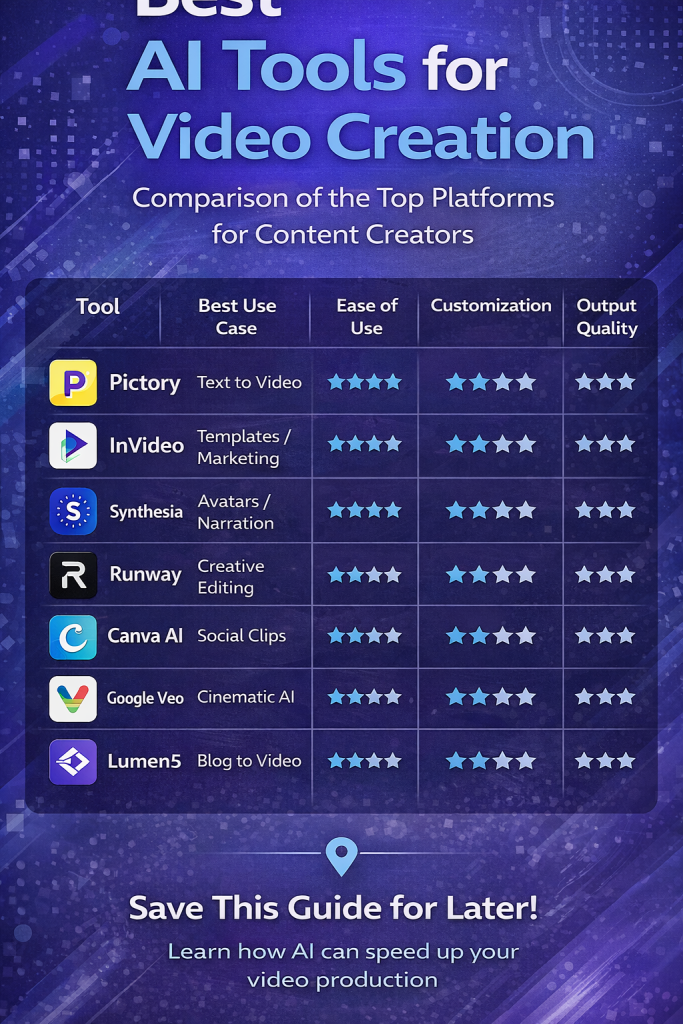
| Tool | Best Use Case | Ease of Use | Customization | Output Quality |
|---|---|---|---|---|
| Pictory | Text to Video | ⭐⭐⭐⭐ | ⭐⭐⭐ | ⭐⭐⭐ |
| InVideo | Templates/Marketing | ⭐⭐⭐⭐ | ⭐⭐ | ⭐⭐⭐ |
| Synthesia | Avatars/Narration | ⭐⭐⭐ | ⭐⭐⭐⭐ | ⭐⭐⭐⭐ |
| Runway | Creative Editing | ⭐⭐⭐ | ⭐⭐⭐⭐ | ⭐⭐⭐⭐ |
| Canva AI | Social Clips | ⭐⭐⭐⭐ | ⭐⭐ | ⭐⭐⭐ |
| Google Veo 3 | Cinematic AI | ⭐⭐ | ⭐⭐⭐⭐ | ⭐⭐⭐⭐ |
| Lumen5 | Blog to Video | ⭐⭐⭐⭐ | ⭐⭐ | ⭐⭐⭐ |
Best AI tools for video creation
Which Tool Should You Choose? (Quick Guide)
Choosing the right AI video tool isn’t about picking the “most powerful” one. It’s about picking the one that matches your current level, your budget, and your content goals.
Different stages require different weapons. Here’s the no-nonsense breakdown:
Beginner / Low Budget
Pictory or Canva AI — Simple workflows, minimal friction, fast results.
If you’re just starting out, you don’t need complexity. You need clarity and speed. Both platforms are designed for creators who want to turn scripts, blog posts, or ideas into clean videos without learning advanced editing software.
Why they work:
- Drag-and-drop interfaces.
- Templates that do most of the heavy lifting.
- Low technical barrier.
- Affordable entry pricing.
Perfect for:
- Faceless YouTube starters.
- Repurposing blog content into video.
- Testing content ideas without overthinking production.
If your biggest obstacle is “I don’t know where to start,” this is your lane.
Social Media Focus
InVideo and Lumen5 — Built for speed, trends, and scroll-stopping formats.
These platforms shine when your priority is volume and platform optimization. Think vertical videos, captions baked in, fast hooks, and quick exports.
Why they work:
- Social-first templates.
- Fast rendering for short-form content.
- Easy adaptation for Reels, Shorts, and TikTok-style formats.
- Designed for quick iteration.
Perfect for:
- Daily content posting.
- Affiliate product videos.
- Trend-based or reactive content.
- Marketing experiments.
If your game is consistency and reach, these tools keep you moving.
Professional / Brand Level
Synthesia or Runway — More control, more polish, more production value.
When you need videos that look corporate-ready, training-grade, or brand-consistent, these tools step up. They offer better output control, more advanced features, and refined visual results.
Why they work:
- AI avatars and presenter-style videos (Synthesia).
- Advanced editing, generative effects, and creative control (Runway).
- More reliable consistency.
- Stronger suitability for client-facing or enterprise content.
Perfect for:
- Corporate training videos.
- Brand campaigns.
- Professional presentations.
- Agencies delivering paid client work.
If your content represents a brand — not just a channel — quality expectations rise. These tools reflect that.
Cinematic / Next-Gen Visuals
Google Veo 3 — For creators who want to push visual boundaries.
If you’re aiming for cinematic sequences, dynamic motion, and visually ambitious storytelling, this category is about creative experimentation at the edge.
Why it stands out:
- High-quality generative visuals.
- More advanced scene understanding.
- Cinematic realism and motion potential.
- Strong alignment with next-gen AI filmmaking.
Perfect for:
- High-concept storytelling.
- Creative portfolios.
- Experimental content.
- Visually driven YouTube channels.
If you care about aesthetic impact more than production speed, this is where innovation lives.
The Real Decision Framework
Ask yourself three questions:
- Am I optimizing for speed or quality?
- Am I experimenting or delivering for a paying client?
- Do I need simplicity or control?
Beginners overcomplicate. Professionals over-optimize. The smart move is choosing the tool that fits your current stage — not the one that flatters your ego.
Start where friction is lowest.
Upgrade when your content demands it.
Scale when the results justify it.
AI Video Tools in Real Content Workflows
Understanding the tools is one thing — applying them effectively is another.
Most successful creators use a hybrid approach:
- Script creation — Plan messaging with AI text tools
- Video generation — Use an AI video maker for visuals
- Voice & pacing — Add AI voiceovers or captions
- Platform adaptation — Resize and format for YouTube, TikTok, Reels
- Optimization — Use analytics to refine future content
AI tools don’t replace strategy. They accelerate execution.
Common Pitfalls and How to Avoid Them
Even the best tools can fail if they are used poorly. Common mistakes include:
- Generating videos without a clear script
- Ignoring platform format (vertical vs horizontal)
- Using generic visuals without brand identity
- Publishing without testing and iteration
The key to success is combining AI speed with human direction.
AI tools for video creation: Conclusion
AI tools for video creation are transforming how content is made. Whether you’re a beginner, marketer, small business owner, or professional creator, there’s an AI platform that fits your workflow.
From simple text-to-video engines to cinematic generative tools, the choices available today allow you to produce videos that were once only possible with professional teams.
The goal isn’t to use every tool, but to find the ones that align with your needs, masters them, and build consistent workflows that deliver results.
AI doesn’t replace creators. It multiplies impact.