The Best AI Tools That Make Videos in 2026: A Practical Guide for Creators and Small Businesses
AI video tools have changed quickly. A few years ago, most AI video platforms were useful only for basic templates, simple captions, or experimental clips that looked interesting but were difficult to use in real projects. In 2026, the landscape is very different.
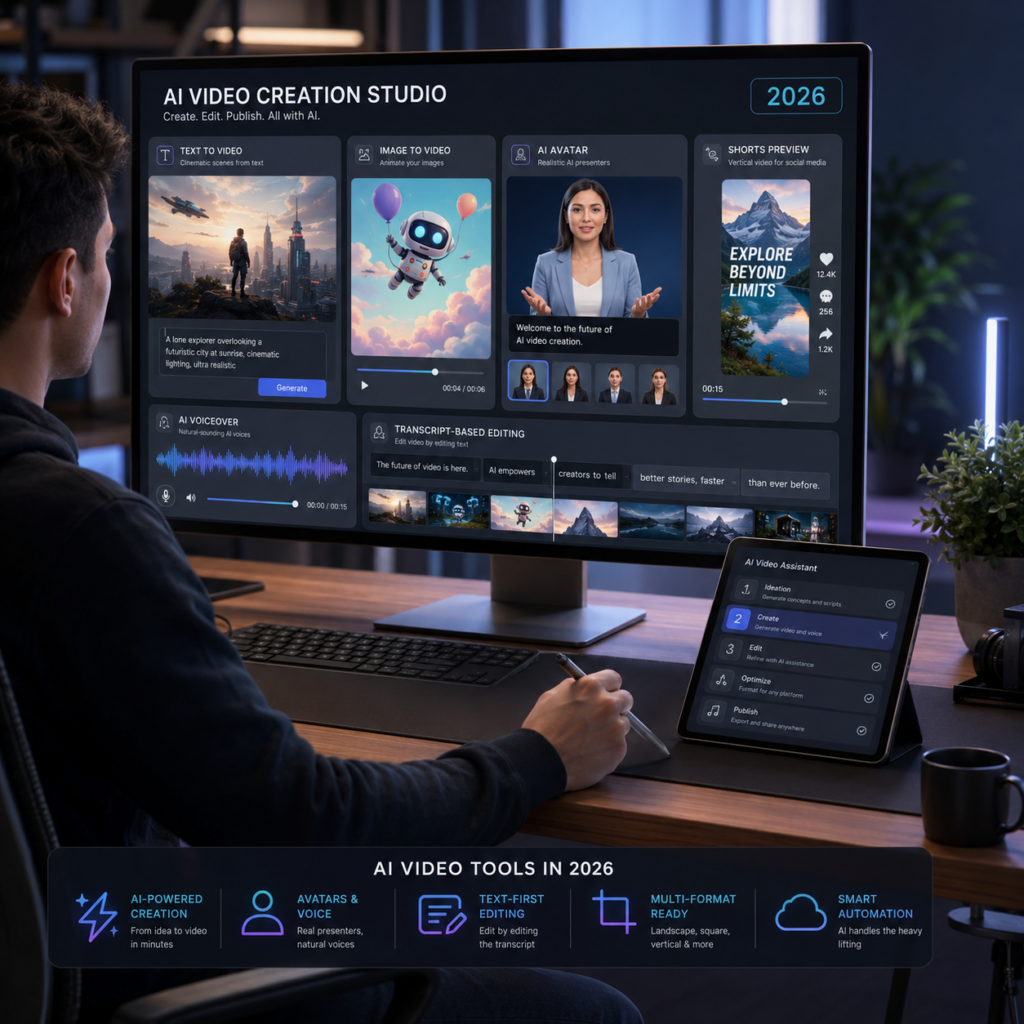
Today, creators can generate short cinematic clips from text prompts, animate images, create avatar-led videos, turn scripts into social media content, translate videos into other languages, and edit recordings using AI assistance. The challenge is no longer finding an AI tool that can make a video. The real challenge is choosing the right tool for the type of video you actually need.
This guide is designed for creators, marketers, educators, small businesses, and beginners who want a clear overview of the best AI tools that make videos in 2026. It is not a list of “magic” tools that do everything perfectly. AI video generation is powerful, but it still has limits. Some platforms are better for cinematic clips. Others are better for talking avatars, tutorials, social media videos, product explainers, or repurposing blog posts into short videos.
The goal is simple: help you understand which AI video tools are worth considering, what each one is best for, and where each tool may fall short.
Quick Answer: What Are the Best AI Tools That Make Videos in 2026?
The best AI video tool depends on your goal.
For cinematic AI-generated clips, Runway, Google Veo, Kling AI, and Luma AI are among the strongest options. For business videos with AI presenters, Synthesia and HeyGen are more practical. For turning scripts, articles, or ideas into complete social media videos, Pictory and Invideo are easier for beginners. For editing podcasts, screen recordings, and narration-based videos, Descript is one of the most useful tools.
A practical way to think about it is this:
- Use Runway, Google Veo, Kling AI, or Luma AI when you need original AI-generated footage.
- Use Synthesia or HeyGen when you need avatar videos for training, explainers, or business communication.
- Use Pictory or Invideo when you want to turn text into complete edited videos.
- Use Descript when you already have recorded content and need to edit it faster.
- Use ElevenLabs when voice quality is a key part of your video workflow.
No single tool is best for everyone. The best choice depends on your content format, budget, workflow, and how much control you need.
What Are AI Video Tools?
AI video tools are platforms that use artificial intelligence to help create, edit, enhance, or assemble video content. Some tools generate video clips from text prompts. Others animate still images, create digital presenters, generate voiceovers, add captions, clean audio, translate videos, or turn long-form content into shorter clips.
There are several main categories of AI video tools:
- Text-to-video generators
These tools create video clips from written prompts. You describe a scene, movement, camera angle, or mood, and the system generates a short video. - Image-to-video tools
These platforms animate a still image and turn it into a moving clip. This is useful for product visuals, character animation, social media posts, and creative experiments. - AI avatar platforms
These tools create videos with digital presenters who speak your script. They are commonly used for training, tutorials, onboarding, sales explainers, and educational content. - Script-to-video tools
These platforms take a script, article, URL, or idea and assemble a video using stock footage, AI visuals, captions, music, and voiceover. - AI video editors
These tools help edit existing footage faster. They can remove filler words, generate captions, improve audio, create clips, or edit video through a transcript. - AI voice and dubbing tools
These tools generate narration, voiceovers, translated audio, or voice clones. They are often used together with video platforms.
Understanding these categories matters because many people waste time looking for one tool that does everything. In practice, the best results usually come from combining two or three tools in a simple workflow.
Best AI Video Tools in 2026
1. Runway
Runway is one of the most recognized platforms in AI video generation. It is especially useful for creators who want to generate cinematic clips, experiment with visual styles, create motion from images, or produce more artistic video sequences.
Runway has become popular because it focuses on creative control. It is not only a simple prompt-to-video tool. It also includes features for image-to-video, video editing, background removal, motion control, and visual experimentation. Runway’s Gen-4 and Gen-4.5 models have been positioned around stronger visual consistency, realistic motion, and higher creative control, according to Runway’s own model announcements.
Best For
Runway is best for:
- Short cinematic clips
- Concept videos
- Music video visuals
- Experimental storytelling
- AI-generated B-roll
- Creative ads
- Visual sequences where style matters
Strengths
Runway is strong when you want a clip that looks visually distinctive. It gives creators more room to experiment with camera motion, lighting, subject references, and cinematic direction. For people who care about the look and feel of the image, Runway can produce results that feel more creative than basic template-based tools.
Limitations
Runway is not always the easiest option for beginners. Getting great results usually requires prompt testing, visual references, and several generations. Like most AI video generators, it can still struggle with hands, text inside the image, complex interactions, consistent characters across long scenes, and realistic physical movement.
It is better for creating clips than for producing a complete finished YouTube video from start to finish. You may still need another editor, voice tool, or assembly platform.
2. Google Veo
Google Veo is Google DeepMind’s advanced video generation model. Veo 3.1 is described by Google as supporting text-to-video, image-to-video, text-to-audio-plus-video generation, and realistic physics.
For creators, the most interesting part of Veo is its focus on realism, motion quality, and native audio generation. This makes it relevant for people who want cinematic scenes, realistic movement, and more complete audiovisual outputs.
Best For
Google Veo is best for:
- Realistic AI video clips
- Cinematic B-roll
- Visual concepts with natural motion
- Short creative scenes
- AI video experiments with sound
- Developers or advanced users working through Google AI tools
Strengths
Veo’s main advantage is the quality of its video model. It is designed for high-fidelity video generation and can be useful when realism is more important than speed. The native audio direction also makes it more interesting than tools that only generate silent clips.
Limitations
Access, pricing, and usage options may change depending on Google’s products, subscriptions, and developer tools. Before publishing specific pricing or availability details, check Google’s official Veo, Gemini, or AI Studio pages.
For everyday creators, Veo may feel less straightforward than tools designed specifically for social media production. It is powerful, but it may not be the fastest path if you simply want a captioned video for Instagram, TikTok, or YouTube Shorts.
3. Kling AI
Kling AI is another major AI video platform focused on video generation, image generation, sound generation, effects, and creative tools. Kling AI’s current site presents Kling 3.0 as part of an all-in-one creative studio with video, image, sound, and motion tools.
Kling has become popular among users who want strong motion, cinematic camera movement, and short-form AI-generated clips. It is often compared with Runway, Veo, Luma, and other advanced video models.
Best For
Kling AI is best for:
- Image-to-video animation
- Short cinematic scenes
- Social media visuals
- Fantasy, anime, product, and stylized video concepts
- Motion-heavy AI clips
- Creative tests where visual energy matters
Strengths
Kling can be very useful for creators who want dynamic movement. It is often used for clips that need camera motion, animated scenes, character movement, or visually striking social media content.
It also has a broader creative studio approach, which can make it appealing for users who want video generation, effects, image tools, and audio-related features in one place.
Limitations
As with other AI video tools, results can vary. A prompt may look excellent in one generation and strange in the next. Character consistency, fine details, accurate text, and complex human movement can still require multiple attempts.
Another important point is licensing and originality. Users should avoid generating content based on copyrighted characters, celebrities, protected brands, or recognizable entertainment franchises unless they have the legal right to do so.
4. Luma AI
Luma AI is a creative AI platform known for its Ray video models and Dream Machine ecosystem. Luma’s recent updates have focused on creative workflows, video generation, model APIs, and more advanced control for creators. Its site lists Ray3.2 Model & API as a 2026 release focused on creative control for video generation.
Luma is a strong option for creators who want image-to-video, cinematic movement, and visually polished AI clips.
Best For
Luma AI is best for:
- Image-to-video generation
- Cinematic short clips
- Smooth motion tests
- Product-style visuals
- Creative B-roll
- Visual concepts for ads, websites, and social media
Strengths
Luma is especially useful when you already have a strong image and want to animate it. This makes it helpful for creators who design visuals in another tool first and then bring them to life with motion.
For example, a small business could create a product image, lifestyle scene, or brand visual and then use Luma to generate a short animated clip for social media.
Limitations
Luma is not a full video production system by itself. It is better for creating video assets than for managing the entire process of scripting, narration, editing, publishing, and analytics.
As with other generative video tools, it may need several attempts before the motion looks natural. You should also check the official plan details before publishing any specific claim about commercial usage, credits, resolution, or export rights.
5. Adobe Firefly
Adobe Firefly is Adobe’s generative AI platform for creative work. Firefly includes tools for images, video, audio, and creative editing. Adobe positions its AI video generator around text-to-video and image-to-video workflows, with an emphasis on brand-safe creative production.
Firefly is especially relevant for creators and businesses already using Adobe tools. It can fit naturally into workflows that involve Photoshop, Premiere Pro, Express, or other Adobe products.
Best For
Adobe Firefly is best for:
- Brand-safe creative assets
- Marketing visuals
- AI-generated B-roll
- Social media clips
- Designers already using Adobe tools
- Teams that need more control over commercial creative workflows
Strengths
The biggest advantage of Adobe Firefly is its connection to the Adobe ecosystem. If you already use Adobe tools, Firefly can feel more practical than a standalone AI generator. It is also a better fit for businesses that care about brand safety, editing control, and professional creative workflows.
Limitations
Firefly may not always be the most cinematic or experimental AI video generator compared with tools like Runway, Kling, or Veo. It is better understood as part of a broader creative production environment rather than just a prompt-to-video playground.
As always, check Adobe’s official pages for current plan limits, generative credits, usage rights, and commercial terms before publishing specific details.
6. Pictory
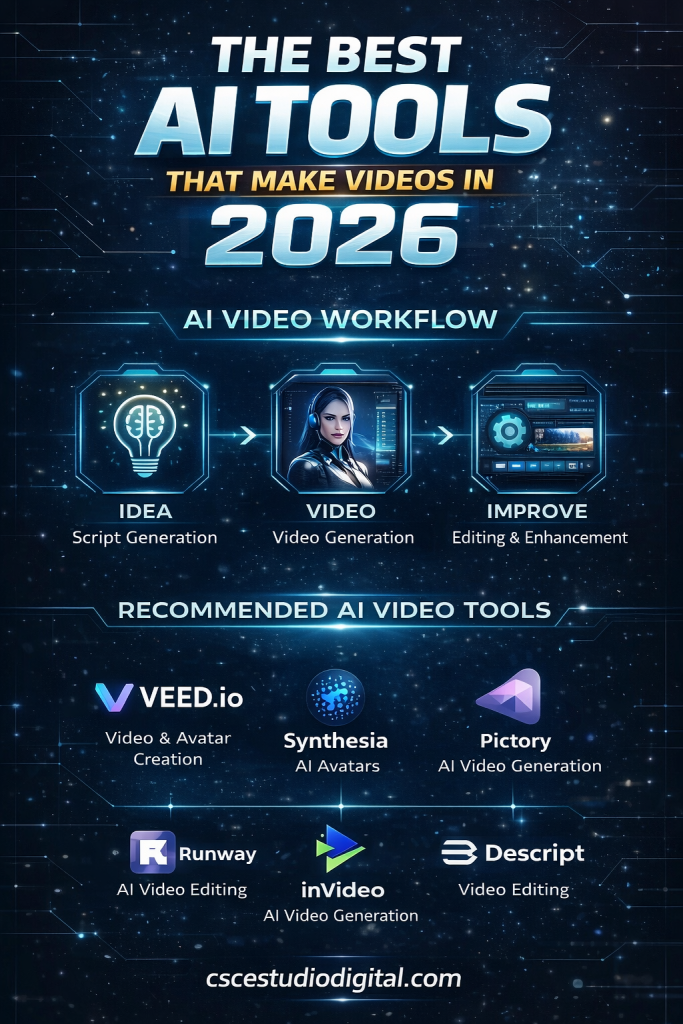
Pictory is a practical AI video platform for turning text, scripts, URLs, blog posts, presentations, images, and recordings into videos. Its official site describes support for text-to-video, URL-to-video, audio-to-video, AI avatars, an AI video editor, captions, voices, templates, and branded videos.
Pictory is less about generating cinematic scenes from scratch and more about assembling useful videos quickly. That makes it a strong option for beginners, bloggers, educators, and small businesses.
Best For
Pictory is best for:
- Turning blog posts into videos
- Creating simple explainer videos
- Producing social media clips
- Adding captions quickly
- Repurposing written content
- Creating educational videos from scripts
Strengths
Pictory is easy to understand. You can start with a script, article, idea, or URL and use the platform to build a structured video. It can help with visuals, captions, voiceover, and formatting.
For a small business, this is more useful than a complex cinematic generator. If you have a blog post, service page, or FAQ article, Pictory can help convert that content into a video format without starting from zero.
Limitations
Pictory’s automated visual choices may not always match the exact meaning of your script. You may need to replace clips, adjust captions, change voiceovers, or edit the pacing.
It is not the best tool if you want highly original cinematic footage. It works better for practical, informational videos than for artistic video generation.
7. Invideo
Invideo is an AI video platform designed to help users create videos from prompts, scripts, and structured ideas. Its current site emphasizes agent-based video creation, multi-shot editing, and helping users describe scenes without needing to become prompt engineers.
Invideo is useful for creators who want a more guided video creation process. Instead of building every scene manually, users can describe what they want and use the platform to generate and edit the video.
Best For
Invideo is best for:
- Social media videos
- Marketing videos
- Product explainers
- Short ads
- YouTube Shorts
- Beginner-friendly video creation
- Prompt-based video workflows
Strengths
Invideo is strong for people who want speed and structure. It can help turn ideas into usable videos without requiring advanced editing knowledge.
It is also useful when you want a workflow that combines AI generation, stock assets, voice, editing, and formatting for different platforms.
Limitations
The generated videos may still require manual editing. If your brand has a very specific visual style, you should not expect the first draft to be perfect. You may need to refine the script, change scenes, adjust pacing, and review the final output carefully.
For serious brand work, always check stock asset licensing, AI model usage terms, export quality, and watermark rules before publishing.
8. Synthesia
Synthesia is one of the best-known AI avatar video platforms. Its official site describes it as an AI video platform for business, with AI avatars, voiceovers, and support for many languages. Synthesia also states that its free plan includes limited monthly video creation, stock avatars, and AI voices.
Synthesia is not mainly for cinematic AI clips. It is for presenter-led videos where an avatar delivers your script on screen.
Best For
Synthesia is best for:
- Training videos
- Internal business communication
- Educational videos
- Product explainers
- Onboarding content
- Multilingual video localization
- Professional avatar presentations
Strengths
Synthesia is useful when you need a clean, professional presenter video without filming a person. It can save time for companies that produce training or explainer content regularly.
The ability to use avatars and different languages makes it especially useful for businesses, educators, and teams creating repeatable video content.
Limitations
Avatar videos can feel polished but also somewhat corporate. They are not always the best choice for entertainment, personality-led YouTube channels, or content where authenticity matters.
Viewers can often recognize avatar-style videos, so the script, pacing, and visual design need to be strong. A realistic avatar cannot fix a boring script.
9. HeyGen
HeyGen is another major platform for AI avatar videos, video translation, personalized videos, and business communication. It is often compared with Synthesia because both tools focus on presenter-led AI video.
HeyGen is useful for creators and companies that want realistic avatars, translated video content, or simple video messages without recording themselves.
Best For
HeyGen is best for:
- Avatar videos
- Personalized outreach videos
- Product explainers
- Video translation
- Short business presentations
- Multilingual content
Strengths
HeyGen is generally approachable and useful for fast avatar-based video creation. It can work well for businesses that need to create videos in more than one language or want to test presenter videos without hiring talent.
Limitations
As with Synthesia, the main limitation is that avatar videos can feel generic if the script is weak. The technology can create the presenter, but it cannot automatically create trust, personality, or a strong message.
You should also review consent rules, voice cloning policies, avatar rights, and commercial usage terms before using it for client work.
10. Descript
Descript is an AI video and podcast editor that lets users edit audio and video in a text-based interface. Its official site describes video editing as being as easy as typing, with tools for recording, transcription, editing, screen recording, AI enhancement, and media generation.
Descript is different from most tools in this list. It does not primarily generate cinematic clips from text prompts. Instead, it helps you edit existing content faster.
Best For
Descript is best for:
- Podcast videos
- Talking-head videos
- Screen recordings
- Tutorials
- Webinar repurposing
- Interview editing
- Removing filler words and mistakes
Strengths
Descript is extremely useful when your video is based on spoken content. Editing a transcript is often faster than cutting audio and video manually on a timeline.
For creators who record tutorials, podcasts, interviews, or educational content, Descript can save a significant amount of editing time.
Limitations
Descript is not the best choice if your main goal is generating original cinematic visuals. It is an editing and production tool, not a complete replacement for a visual AI generator.
It also requires careful review. AI transcription and automated edits can make mistakes, especially with names, technical terms, accents, or overlapping speech.
11. ElevenLabs
ElevenLabs is best known for AI voice generation, but it is an important part of many AI video workflows. Its official site presents tools for speech, voice, sound effects, music, localization, and creative audio production.
Even when a tool can generate visuals, the final video often depends heavily on voice quality. A weak or robotic voiceover can make an otherwise good video feel low-quality.
Best For
ElevenLabs is best for:
- AI voiceovers
- Narration for faceless videos
- Educational videos
- Explainer videos
- Dubbing and localization
- Audio for Shorts, Reels, and TikToks
Strengths
ElevenLabs can produce natural-sounding voiceovers that work well for videos. It is useful when you want narration but do not want to record your own voice.
It also gives creators more flexibility when testing different tones, accents, pacing, and narration styles.
Limitations
Voice generation should be used responsibly. Do not clone or imitate someone’s voice without permission. Also, even high-quality AI voices can sound unnatural if the script is poorly written.
For best results, write scripts in a spoken style. Short sentences, clear transitions, and natural pacing matter.
What About Sora?
Sora deserves a special mention because many people still search for it when researching AI video generators. However, it should not be treated as a normal active recommendation without checking the latest official status.
OpenAI’s help documentation states that the Sora web and app experiences were discontinued on April 26, 2026, and that the Sora API will be discontinued on September 24, 2026. For that reason, creators looking for active AI video tools should verify availability directly before building a workflow around Sora.
This is a good example of why AI tool articles need regular updates. In this market, a tool can be impressive, widely discussed, and still not be the best practical recommendation for current users.
Comparison Table: Best AI Video Tools by Use Case
| Tool | Best Use Case | Best For | Main Limitation |
|---|---|---|---|
| Runway | Cinematic AI clips | Creators, filmmakers, artists | Requires testing and prompt refinement |
| Google Veo | High-fidelity video generation | Advanced creators, developers | Availability and access may vary |
| Kling AI | Dynamic short AI clips | Social media creators | Consistency can vary |
| Luma AI | Image-to-video and cinematic motion | Designers, creators, marketers | Not a full editing workflow |
| Adobe Firefly | Brand-safe creative assets | Designers, businesses | Less focused on experimental clips |
| Pictory | Script or article to video | Bloggers, educators, small businesses | Automated visuals need review |
| Invideo | Prompt-based social videos | Marketers, beginners | Requires manual polishing |
| Synthesia | AI avatar videos | Businesses, trainers, educators | Can feel corporate or generic |
| HeyGen | Avatar videos and translation | Marketers, teams, creators | Script quality matters heavily |
| Descript | AI video editing | Podcasters, YouTubers, educators | Not mainly for visual generation |
| ElevenLabs | AI voiceover | Faceless channels, explainers | Voice ethics and script quality matter |
How to Choose the Right AI Video Tool
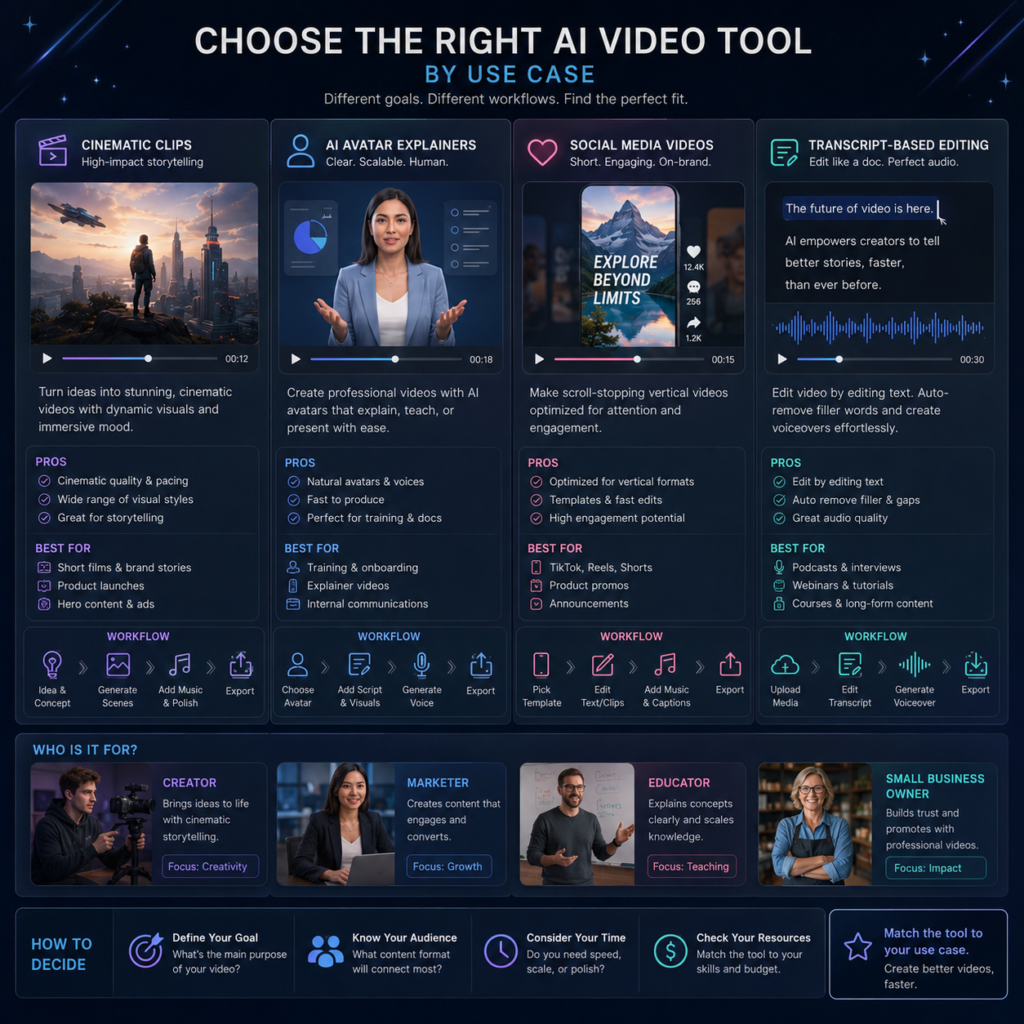
Choosing an AI video tool is easier when you start with the type of video you want to create.
If You Want Cinematic AI Clips
Start with Runway, Google Veo, Kling AI, or Luma AI. These tools are better for generating original footage, visual scenes, motion experiments, and creative clips.
Use them when you need B-roll, surreal visuals, product concepts, animated images, or cinematic shots.
If You Want Business Videos
Start with Synthesia or HeyGen. These tools are better when you need a presenter, an explainer, a training video, or a multilingual business message.
They are especially useful for internal training, onboarding, product education, and professional communication.
If You Want Social Media Videos Fast
Start with Pictory or Invideo. These platforms are more practical for turning ideas, scripts, URLs, or blog posts into complete videos with captions, visuals, and music.
They are better for beginners than advanced generative video models.
If You Already Record Content
Use Descript. It is ideal when you already have footage from a podcast, webinar, tutorial, screen recording, or talking-head video.
If Your Video Needs Better Narration
Use ElevenLabs or another high-quality AI voice tool. Voice is one of the fastest ways to improve perceived video quality.
Common Limitations of AI Video Tools
AI video tools are useful, but they are not perfect. A realistic review should include the problems users may face.
1. Inconsistent Results
The same prompt can produce different results. Sometimes the first generation works. Other times, you may need five or ten attempts.
2. Character Consistency Problems
AI tools still struggle to keep the same character, face, outfit, or object consistent across multiple scenes. Some tools are improving this, but it remains a common issue.
3. Strange Hands, Faces, and Movement
Human movement is difficult. Hands, eyes, walking, dancing, and physical interactions can still look unnatural.
4. Weak Text Inside Videos
Many AI video generators are not reliable for creating readable text inside a video scene. Add titles, captions, and labels later in a video editor.
5. Credit and Cost Limits
Generative video can use credits quickly. Before committing to a platform, check how many videos you can generate, how long each clip can be, whether exports include watermarks, and what commercial rights are included.
6. Licensing and Copyright Concerns
Avoid generating videos that imitate celebrities, copyrighted characters, logos, movie scenes, or protected brand assets. This is especially important for business and client work.
7. Editing Is Still Required
AI can create a draft, but most videos still need human review. You should check pacing, accuracy, captions, visuals, audio levels, and overall message clarity before publishing.
A Simple AI Video Workflow for Beginners
If you are just starting, do not try to use every tool at once. A simple workflow is better.
Here is a practical beginner workflow:
- Write a short script using your own knowledge, notes, or research.
- Generate a voiceover with ElevenLabs or record your own voice.
- Create visuals using Pictory, Invideo, Luma, or Runway.
- Edit the final video in Descript, CapCut, Premiere, or another editor.
- Add captions manually or with an AI caption tool.
- Review the video for accuracy, pacing, and visual quality.
- Export in the right format for YouTube, TikTok, Instagram, or your website.
This workflow is simple enough for beginners but flexible enough to improve over time.
Final Verdict: Which AI Video Tool Is Best in 2026?
There is no single best AI video tool for everyone.
If you want cinematic AI-generated visuals, start with Runway, Google Veo, Kling AI, or Luma AI. If you want business-friendly avatar videos, consider Synthesia or HeyGen. If you want to turn written content into videos quickly, Pictory and Invideo are more practical. If you record podcasts, tutorials, or screen videos, Descript can make editing much easier. If narration matters, ElevenLabs is one of the most useful tools to add to your workflow.
The smartest approach is not to chase every new AI tool. Start with the kind of video you actually need to make. Then choose the tool that solves that specific problem with the least friction.
AI video tools are improving quickly, but good video still depends on clear ideas, useful scripts, careful editing, and a real understanding of the audience. The tool helps. The direction still matters.
Frequently Asked Questions
What is the best AI tool that makes videos from text?
For cinematic clips, Runway, Google Veo, Kling AI, and Luma AI are strong options. For complete social media videos from scripts or ideas, Pictory and Invideo are usually easier for beginners.
Can AI video tools make full YouTube videos?
Yes, some tools can help create full YouTube videos, but most still require editing. AI can help with scripts, voiceovers, visuals, captions, and assembly, but you should review the final video carefully before publishing.
Are AI video generators free?
Many AI video tools offer free trials or limited free plans, but serious use usually requires a paid plan or credits. Always check the official pricing page before publishing or relying on a tool.
Which AI video tool is best for beginners?
Pictory and Invideo are among the easiest starting points because they help turn scripts, ideas, or articles into structured videos. Descript is also beginner-friendly if you already have recorded content.
Which AI video tool is best for avatar videos?
Synthesia and HeyGen are two of the strongest options for AI avatar videos. They are useful for business explainers, training videos, educational content, and multilingual presentations.
Which AI video tool is best for cinematic clips?
Runway, Google Veo, Kling AI, and Luma AI are better choices for cinematic AI-generated clips. The best option depends on the visual style, access, pricing, and level of control you need.
Can I use AI-generated videos commercially?
It depends on the platform, plan, asset sources, and license terms. Before using AI-generated videos for business, ads, clients, or monetized content, check the official commercial usage rules of the tool you are using.
Should I use Sora in 2026?
Check OpenAI’s official documentation before relying on Sora. OpenAI has stated that the Sora web and app experiences were discontinued on April 26, 2026, and that the API will be discontinued on September 24, 2026. Because of that, Sora should not be treated as a standard active recommendation without verifying its current status.
Recommended Official Sources to Verify Before Publishing
- Runway official website
- Google Veo by DeepMind
- Kling AI official website
- Luma AI official website
- Adobe Firefly AI Video Generator
- Pictory official website
- Invideo official website
- Synthesia official website
- HeyGen official website
- Descript official website
- ElevenLabs official website
- OpenAI Sora discontinuation note