
What Grok Imagine can do?
Grok Imagine is one of the most discussed and controversial AI creative tools in 2026. Built by xAI — the company behind Grok, the AI assistant integrated with X (formerly Twitter) — Grok Imagine aims to turn ideas into short videos with synchronized audio straight from text or image prompts.
Grok Imagine Review
Powered by the Aurora multimodal generation engine, the system supports multiple workflows including text-to-image, image editing, text-to-video, and image-to-video, creating clips that include background music, effects, and dialogue.
Unlike many AI tools that generate still images only, Grok Imagine tries to stretch into dynamic visual storytelling, offering creators the ability to animate images or generate new video content directly in the browser or app.
This review explores what Grok Imagine really does in 2026, its architecture and creative promise, limitations and reliability issues, workflows that make it effective, practical use ideas, pricing considerations, and how it compares to other AI video generators in the market.
What Grok Imagine Does Best
Grok Imagine excels at rapid generation of short video clips enriched with audio that can include music, environmental sounds, voice-style dialogue, and effects. It was originally pitched as a kind of “AI Vine” — short, punchy videos from simple prompts, reminiscent of the iconic six-second clips popularized in the early 2010s.
Where many competitors stop at still image generation or silent animations, Grok Imagine offers synchronized audio playback built into the generation process. This means creators don’t need separate sound editors or music scoring tools. The system also understands and interprets prompts with camera moves like zoom and pan, making the output feel more cinematic than still-image-based loops.
Another core strength is multi-input support: you can start with text, upload an image, or transform existing footage with natural language commands — letting you animate scenes or breathe motion into static visuals without traditional animation tools.

Grok Imagine Key Features Explained
Multimodal Prompt Support (Text, Image, Video)
Grok Imagine doesn’t limit you to text prompts. You can upload images and tell the system what kinds of motion or style you want to apply, effectively animating existing visuals with natural language.
Synchronized Sound and Audio Generation
One of the most unique selling points is Grok Imagine’s automatic audio scoring — background music, sound effects, and even dialogue are woven into the video during generation, without needing any post-production.
Modes for Creative Control
The platform offers multiple generation “modes” — Normal for balanced outputs, Fun for more whimsical results, Custom for detailed control, and even “Spicy” for more unrestricted creative directions. That said, the existence of a Spicy mode has drawn significant controversy due to misuse potential.
Fast Iteration and Multiple Variations
Grok Imagine can produce multiple variations of a prompt at once (often four unique outputs), enabling rapid creative iteration. This is useful for experimenting with different visuals or styles in minutes.
Multiple Aspect Ratios
Support for common video formats such as 9:16 for TikTok/Reels, 16:9 for YouTube, and 1:1 for Instagram makes the tool versatile for social platforms without extra resizing steps.
Grok Imagine Pros and Cons
Pros
• Fast generation with audio included — You don’t need external editors or music libraries.
• Multi-style outputs — Realistic, fantasy, sci-fi and other creative tones possible through descriptive prompts.
• Multi-input workflows — Text, image, and video-to-video workflows expand creative flexibility.
• Multiple aspect ratios & output options — Good for various social media and creative needs.
• Rapid iteration with variations — Practical for testing multiple creative directions quickly.
Cons
• Short output length — Clips are typically capped around 6–15 seconds, limiting longer narrative possibilities.
• Quality inconsistency — Community reports vary widely; some creators find motion choppy, artifacts present, or final clips less polished than hoped.
• Service instability and occasional failures — Users have experienced generation failures or downtime, especially on mobile apps.
• Content moderation and misuse concerns — The Spicy mode and earlier controversies highlight weak safeguards that have allowed inappropriate or explicit content creation.
• Lack of advanced editing controls — No timeline, keyframe, or fine-tuning controls like dedicated editors.
Who Should Use This Tool
Grok Imagine is designed for speed, experimentation, and idea generation. It thrives in environments where momentum matters more than pixel-perfect control and where iteration beats perfection.
Grok Imagine is best suited for:
• Social media creators and marketers who need fast, attention-grabbing short clips for platforms like TikTok, Instagram Reels, or YouTube Shorts. When volume and consistency drive growth, speed becomes a competitive advantage.
• Rapid prototyping workflows where ideas must be tested quickly. Agencies, startups, and solo creators can validate visual concepts before investing time or budget into full production.
• Visual storytellers exploring mood boards, concept scenes, or pitch materials. It works well for drafting visual directions, pre-visualizing campaigns, or communicating creative ideas to clients.
• Experimenters and AI enthusiasts who enjoy testing the boundaries of generative media. If you like pushing prompts, iterating styles, and discovering unexpected outputs, this tool rewards curiosity.
• Early-stage product teams needing quick demo visuals or explainer-style snippets without committing to traditional production pipelines.
• Educators and content instructors who want to generate simple illustrative clips to enhance presentations or online lessons.
Grok Imagine is not ideal for:
• Long-form storytelling that requires structured narrative development, precise scene continuity, and detailed character consistency. It is built for short-form impact, not feature-length structure.
• Professional filmmakers who need granular cinematic control over camera movement, lighting, sound design, and post-production workflows. Traditional tools still dominate in high-end production environments.
• Users expecting production-ready advertising assets without refinement. While outputs can be impressive, most commercial campaigns will still require polishing, editing, and brand alignment.
• Complex collaborative workflows involving multiple stakeholders, revision rounds, and strict brand compliance standards.
In short, Grok Imagine is a momentum tool. It excels at speed, ideation, and content acceleration. If your priority is rapid creation and testing, it fits naturally into your workflow. If your priority is cinematic precision and full editorial control, it works better as a complementary tool rather than a replacement.
Pricing, Plans and Limitations
Pricing for Grok Imagine varies by provider or subscription tier (often tied to Grok Premium or standalone plans). Some third-party sites list pricing tiers including 250–5,000 credits per month with commercial rights and priority generation options — ranging roughly from $15 to $70+ per month depending on the plan.
Most plans include set credit quotas with limits on daily generations, image and video outputs, and quality tiers. Exceeding those limits typically requires waiting for quota resets or upgrading to higher tiers.
The free or trial access may exist but is often heavily limited in credits and output formats.
Real-World Use Cases
Viral Social Content and Short Reels
Grok Imagine performs best in fast-paced, short-form environments where attention spans are measured in seconds. Its rapid generation speed and built-in audio capabilities make it highly effective for producing:
• Quick promotional clips
• Scroll-stopping hooks
• Micro-stories with visual impact
• Short educational bursts
• Announcement-style videos
This makes it a strong fit for TikTok, Instagram Reels, and YouTube Shorts, where volume and consistency often matter more than cinematic perfection.
Creators can test multiple variations of the same concept in minutes, refine what performs best, and quickly adapt to audience feedback. In short-form ecosystems, speed is leverage — and Grok Imagine is built for speed.
Concept Visualization and Storyboarding
Before investing time and budget into full production, many creators and teams need to see ideas in motion. Grok Imagine helps bridge that gap by turning written concepts into moving visuals almost instantly.
It can support:
• Pitch decks that require dynamic visuals
• Mood boards with animated references
• Creative direction previews
• Story concept walkthroughs
• Pre-visualization for marketing campaigns
Instead of explaining an idea verbally, creators can show a rough animated version. This improves communication with clients, collaborators, or internal teams. It reduces ambiguity and accelerates decision-making.
While it does not replace detailed professional storyboarding for large productions, it dramatically lowers the barrier to visualizing early-stage ideas.
Meme and Trend-Driven Content
In trend-based content cycles, timing is everything. By the time a polished production is ready, the trend may already be over.
Grok Imagine excels in environments where:
• Reaction speed is more important than refinement
• Cultural moments shift daily
• Internet humor evolves rapidly
• Experimental content performs well
Creators can quickly generate meme-based visuals, remix trending topics, or produce reactive clips that align with current conversations.
For social-first brands and creators, this ability to move fast can be the difference between relevance and invisibility.
Brand Teasers and Animations
For brands exploring short animated teasers, product reveals, or slogan-driven visuals, Grok Imagine offers a low-cost, low-risk testing ground.
It can be used to generate:
• Short launch teasers
• Simple product highlight animations
• Creative tagline visuals
• Event countdown clips
• Concept-based brand storytelling snippets
Instead of committing to expensive animation teams early on, businesses can test creative angles, messaging styles, and visual themes before scaling production.
While final campaigns may still require professional refinement, Grok Imagine provides an accessible entry point for experimentation and iteration.
Overall, Grok Imagine shines in fast-moving digital environments where creativity, speed, and adaptability matter more than technical perfection. It is not built to replace high-end production — it is built to accelerate idea-to-content execution.
Workflow Tips to Get Better Results
Generating better outputs with Grok Imagine is less about luck and more about structure. The tool responds directly to the clarity and intention behind your prompts. A loose input produces a loose result. A precise input produces something far more usable.
Below are practical ways to improve consistency and quality.
Be Descriptive and Intentional with Prompts
Vague prompts create generic videos. Specific prompts create direction.
Instead of writing:
“Create a promotional video for a fitness brand.”
Add layers of detail:
• What is happening in the scene?
• Who is the subject?
• What camera movement is used? (slow pan, handheld feel, zoom-in)
• What is the lighting style? (dramatic, natural, neon, sunset glow)
• What is the emotional tone? (energetic, inspiring, calm, urgent)
• What pace should the scene follow?
Including actions, movement, atmosphere, and emotional cues dramatically improves coherence. Think like a director giving instructions, not a user typing a casual request.
The more intentional your prompt, the less random your result.
Start with Images Where Possible
Text-only generation works, but adding a visual reference often improves reliability and stylistic consistency.
Uploading a reference image helps with:
• Character consistency
• Brand color alignment
• Scene composition guidance
• Product accuracy
• Mood matching
Even a rough mockup or stock-style reference can anchor the AI’s interpretation. If your goal is brand alignment or repeated character use, image input reduces unpredictability.
In short: text tells the story, images anchor the direction.
Test Multiple Variations
One generation is rarely the best generation.
Small wording changes can produce dramatically different results. Changing a single adjective, camera instruction, or emotional descriptor can shift the entire tone of a clip.
A smart workflow includes:
• Creating 3–5 variations of the same concept
• Adjusting pacing language
• Testing different lighting moods
• Experimenting with alternate framing
Then select the strongest output rather than settling for the first usable one. Iteration is not wasted time — it is how you increase output quality without increasing production cost.
Volume plus selection beats single-shot perfection.
Plan for Revision Loops
AI generation is powerful, but professional publishing often requires refinement.
Expect to:
• Generate multiple drafts
• Trim or polish clips externally
• Adjust timing or text overlays
• Add brand elements manually
• Clean up minor inconsistencies
Treat Grok Imagine as a powerful first-draft engine, not a one-click final product. Building revision loops into your workflow prevents frustration and improves results.
Professionals who get the best outcomes do not rely on a single generation. They combine structured prompting, iteration, and light post-production to elevate the final output.
When used strategically, Grok Imagine becomes more predictable, more efficient, and far more aligned with professional standards. The tool rewards clarity, experimentation, and process discipline.
Common Limitations & How to Mitigate Them
Free AI video creation tools are powerful, but they are not flawless. Understanding their limitations is essential if you want consistent, professional-looking results. The difference between creators who struggle and those who scale is not access to better tools — it’s knowing how to work around constraints intelligently.
One of the most common issues is inconsistent generation quality. Motion may look slightly unnatural, transitions can feel abrupt, or subtle visual artifacts may appear in complex scenes. This usually happens when prompts are overloaded with too many instructions or when the scene requires intricate movement. The solution is counterintuitive: simplify. Shorter, clearer prompts often produce more stable results. Instead of describing a highly detailed cinematic sequence with multiple moving elements, focus on one primary action and one clear environment. If artifacts appear, rephrase your description using simpler language and fewer layered conditions.
Another frequent limitation is generic-looking output. AI tends to default to “safe” visual interpretations when instructions are vague. If a video feels bland, the issue is often insufficient detail. Adding explicit camera directions, lighting descriptions, mood indicators, or environmental specifics can dramatically improve uniqueness. For example, instead of prompting “a person working on a laptop,” specify “close-up shot, warm ambient lighting, modern workspace with soft background blur.” The more intentional your framing details, the less generic the result.
Technical stability can also vary depending on the platform interface. Some users experience crashes, rendering failures, or incomplete exports when using mobile apps. When stability becomes an issue, switching to the web interface on a desktop browser often reduces performance errors. Web versions typically handle rendering processes more reliably, especially for longer or higher-resolution outputs.
Ultimately, free AI video tools reward clarity, simplicity, and iteration. Limitations are not barriers — they are signals guiding you toward better prompt engineering and smarter workflow design.
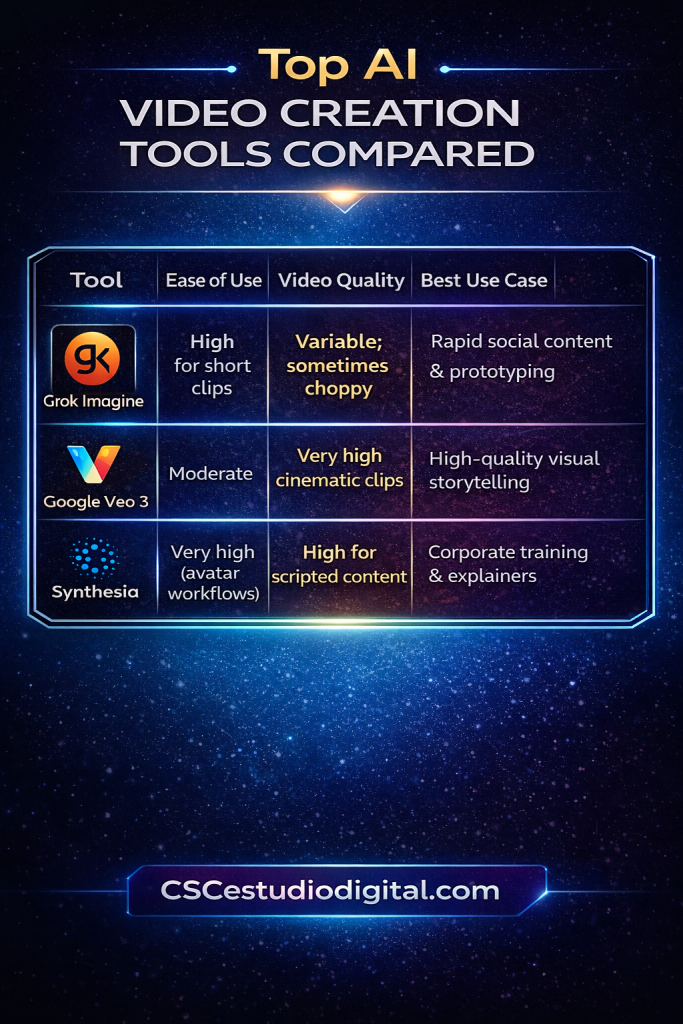
Comparison with Other AI Video Tools
| Tool | Ease of Use | Video Quality | Best Use Case |
|---|---|---|---|
| Grok Imagine | High for short clips | Variable; sometimes choppy | Rapid social content & prototyping |
| Google Veo 3 | Moderate | Very high cinematic clips | High-quality visual storytelling |
| Synthesia | Very high (avatar workflows) | High for scripted content | Corporate training & explainers |
Final Verdict
Grok Imagine occupies an interesting space in the 2026 AI video ecosystem. It is not trying to be a polished studio replacement, and it does not position itself as a rigid enterprise production tool. Instead, it leans heavily into speed, experimentation, and multimodal creativity. For creators who thrive on rapid iteration and short-form impact, that focus makes it surprisingly powerful.
Powered by xAI’s Aurora engine, Grok Imagine handles multi-input workflows in a way that feels fluid rather than technical. Text prompts, visual references, and audio elements can be combined without forcing the user into a complex production pipeline. This flexibility makes it particularly effective for ideation phases. You can test a concept, adjust tone, experiment with pacing, and generate multiple variations within minutes. For short-form platforms where trends shift weekly, that speed creates a real advantage.
One of its strongest features is synchronized audio generation. Instead of adding sound as an afterthought, Grok Imagine integrates voice and effects directly into the creative output. This produces clips that feel more cohesive out of the box. For creators targeting high-retention vertical content, built-in audio alignment can save time and reduce reliance on external editing tools.
That said, Grok Imagine still struggles with consistency. Visual continuity across episodes or campaigns can be difficult to maintain. Character details may subtly change. Motion behavior can vary. Stylistic direction sometimes drifts even when prompts remain similar. For experimental or standalone clips, this unpredictability can feel like creative spontaneity. For branded series or client-facing projects, it introduces friction.
Instability is another consideration. Performance can fluctuate depending on workload and complexity. Rendering reliability is improving, but it is not yet at the level where production teams can depend on it for strict deadlines without buffer time.
Content moderation policies also shape how far creators can push stylistically or thematically. While necessary from a platform governance perspective, these restrictions may limit certain storytelling angles or edgy creative directions.
Because of these factors, Grok Imagine is best viewed as a high-speed creative lab rather than a locked-in production engine. It shines during brainstorming, prototyping, and rapid content experimentation. It allows creators to explore ideas visually before committing resources to more polished workflows.
When integrated into a smart system, Grok Imagine can still be highly productive. For example, it can serve as a testing layer for hooks, visual concepts, or tonal experiments before moving validated ideas into a more controlled production pipeline. Used this way, it becomes a multiplier instead of a risk factor.
In practical terms, Grok Imagine rewards creators who understand its nature. Those expecting precision-level reliability may feel frustrated. Those embracing its speed and flexibility will likely find it energizing.
Ultimately, Grok Imagine stands out not because it is flawless, but because it encourages creative momentum. With tempered expectations and structured workflows, it can become a distinctive and valuable component within a modern AI-driven content stack.
The Future of AI Video Creation
Learn How to Create AI Video Fast an Easy,
If you want a step-by-step guide to create AI videos fast — without learning 50 complicated tools — download the free PDF below and simplify your entire workflow.
Download the free guide:
How to Create AI Videos FAST Without Learning 50 Complicated Tools