
Deevid AI Review 2026: Honest Analysis of This AI Video Generator
Introduction
Deevid AI is a generative AI video creation platform that promises to turn text, images, and videos into finished videos with minimal effort. According to its website, you can transform simple prompts into engaging content using text-to-video, image-to-video, and video-to-video workflows without deep editing skills. It targets marketers, social creators, and storytellers looking for rapid video generation.
In 2026, tools like Deevid AI sit in a crowded field of AI video products — from highly polished corporate tools to experimental open-source models — meaning the real test is not whether a platform can generate video, but how reliably and usefully it does so. This review cuts through the promotional messaging to highlight what Deevid excels at, where it struggles, and who should use it (or avoid it).
What Deevid AI Video Tool Does Best
Deevid AI’s core strength lies in its versatile input options. You can use text prompts, static images, or existing clips as starting points, and the tool will attempt to generate new video content with transitions, motion, and effects. This multi-modal input support theoretically makes it more flexible than tools that only work from text.
For creators needing fast basic clips for banners, intros, or placeholder visuals, Deevid AI can be an appealing choice. The platform emphasizes quick generation and ease of operation, with claims of producing videos in under a minute.

Deevid AI Key Features Explained
Multi-Input Video Generation
Deevid AI supports text-to-video, image-to-video, and video-to-video transformations. This versatility lets users experiment with different content types without bouncing between tools.
Templates and Effects
The platform includes a library of templates and visual effects intended to simplify creative choices and guide output styles, which can help non-designers produce visually appealing clips.
Commercial Rights and No Watermarks
Paid plans typically remove watermarks and include commercial usage rights, which is important for professional publishing and monetization.
Credit-Based Workflow
Deevid AI uses a credit system for each video generation, meaning each attempt consumes part of your monthly allotment, regardless of output quality.
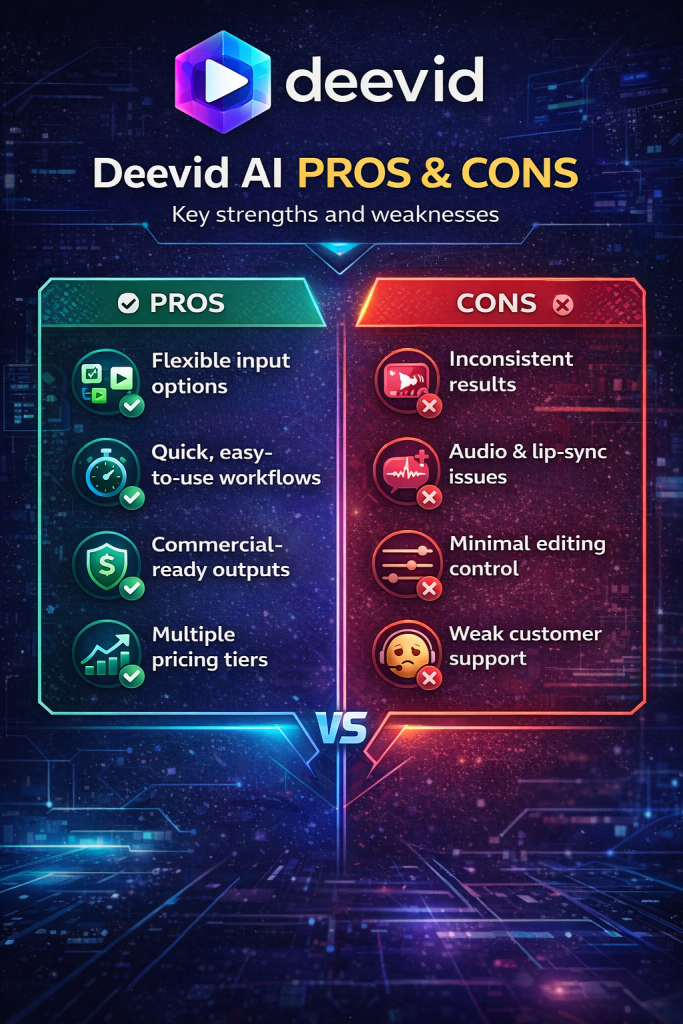
Deevid AI Pros and Cons
Pros
• Flexible input options: Use text, still images, and existing video to create new clips without switching apps.
• Quick generation: Users report the ability to generate videos in under a minute.
• Commercial-ready outputs on paid plans: No watermark and commercial rights included.
• Multiple pricing tiers: From affordable starter plans to high-capacity professional plans.
Cons
• Inconsistent and unpredictable quality: Independent tests note wide variance in results, with some outputs looking polished and others having artifacts or incorrect motion.
• Audio and lip-sync issues: Reviews indicate robotic or poor-quality audio generation and imperfect lip synchronization.
• Minimal editing controls: There’s no timeline editor, keyframe control, or fine-tuning tools, leaving users unable to fix problems without external software.
• Weak customer service: Multiple users report that support is slow, unhelpful, or nonexistent, with billing and cancellation issues.
• Credit burns without output guarantees: Since credits are consumed per generation attempt — even when results are poor — the model can be expensive relative to the value obtained.
Deevid AI Review: Who Should Use This Tool
Deevid AI is not a one-size-fits-all solution — and that’s actually a good thing. Its value depends entirely on how you intend to use it and what expectations you bring into the workflow.
Deevid AI may work especially well for:
• Social media creators who need fast placeholder visuals, short atmospheric clips, or simple B-roll elements rather than fully polished cinematic productions. If your goal is to support commentary, add motion to a static idea, or test visual concepts quickly, the tool can accelerate production without heavy editing.
• Marketers testing ideas rapidly who understand that AI generation often requires iteration. If you’re comfortable running multiple versions, tweaking prompts, and selecting the best output, Deevid can function as a rapid prototyping engine. It allows you to validate creative angles before investing in higher-end production.
• Beginners who want versatility in one platform instead of juggling separate tools for text-to-video, image animation, or basic generation. For users still learning prompt design and AI workflows, having multiple input options inside one interface reduces friction and simplifies experimentation.
In short, Deevid AI can be useful for speed, testing, and creative exploration — especially when perfection is not the primary objective.
However, Deevid AI may not be the best fit for:
• Professionals requiring consistently high-fidelity output. If your brand depends on sharp detail, cinematic realism, and predictable results across projects, variability in AI generation can become a liability.
• Teams that require dependable customer support and transparent billing structures. In collaborative or client-based environments, operational reliability matters just as much as creative output.
• Creators producing long-form narrative content that demands precise scene control, detailed character consistency, or advanced storytelling structure. AI tools like Deevid are generally stronger at short-form generation than tightly controlled cinematic sequencing.
Ultimately, Deevid AI fits best into a creative stack as a rapid generation assistant — not a complete production replacement. When used strategically, it can speed up ideation and visual testing. When used with unrealistic expectations, it can create frustration.
The key is alignment between your goals and the tool’s strengths.
Deevid AI Review Pricing, Plans and Limitations
Deevid AI offers a freemium and credits-based subscription model with several tiers:
• Lite (~$10–$14/month): Around 200 credits/month, 720p output, cross-video consistency, templates, no watermarks.
• Pro (~$25–$35/month): Around 600 credits/month with 1080p output and priority support.
• Premium (~$119–$159/month): Up to 3000 credits/month, 1080p outputs, speed boosts, priority access to new features, and commercial rights.
Credits typically do not rollover indefinitely, and additional packs may be required for heavier use.
Limitations include:
• Credit dependency: You pay per generation attempt.
• Quality inconsistencies at higher resolution: Some users note that 1080p outputs amplify flaws rather than hide them.
Deevid AI Review: Real Use Case Examples
Understanding a tool becomes easier when you see how it fits into real workflows. Deevid AI is not necessarily about producing a final Hollywood-level video. Its strength lies in speed, iteration, and early-stage content development.
Quick Social Reels
One of the most practical uses for Deevid AI is generating fast, short-form clips for platforms like TikTok, Instagram Reels, or YouTube Shorts. Instead of spending hours editing, creators can quickly produce simple visual sequences to test hooks, concepts, or background motion.
For example, you might generate:
- A dynamic background loop for motivational text
- A short animated scene to support a storytelling hook
- Visual context for trending audio
Because short-form content moves fast, speed often matters more than perfection. Deevid allows creators to experiment with multiple variations of the same idea and publish quickly. If one version performs well, it can later be recreated or refined using higher-end production tools.
In this scenario, Deevid acts as a rapid testing engine rather than a final production solution.
Prototype Ad Visuals
Marketing teams and solo entrepreneurs can also use Deevid AI to prototype ad concepts before committing budget to full production.
Instead of jumping directly into expensive shoots or polished motion graphics, you can:
- Generate multiple product scene variations
- Test different visual angles or moods
- Experiment with messaging overlays
This approach is especially useful for validating creative direction. If a concept fails during early testing, you’ve saved both time and money. If it gains traction, you now have proof of concept before scaling.
In performance marketing, iteration speed is a competitive advantage. Deevid’s fast generation can support that cycle.
Placeholder Content for Campaigns
In fast-moving campaigns — such as product launches, limited-time offers, or event promotions — teams often need visual assets immediately. Deevid AI can function as a placeholder or draft-generation tool in these scenarios.
For example:
- Creating temporary visuals for landing pages
- Producing draft animations for dynamic banners
- Generating quick promo clips while final assets are still in production
Instead of delaying a campaign due to missing visuals, teams can deploy temporary AI-generated content and replace it later if needed. This keeps momentum intact.
In short, Deevid AI performs best when used as a rapid ideation and draft-generation tool. It accelerates experimentation, supports quick turnarounds, and fills creative gaps — especially in environments where speed matters more than cinematic precision.
Deevid AI Review Comparison: Top 3 AI Video Creation Tools
| Tool | Ease of Use | Video Quality | Automation Capabilities | Best Use Case | Price vs Value |
|---|---|---|---|---|---|
| Deevid AI | Moderate (simple UI, inconsistent results) | Variable (wide quality range) | Moderate (multi-input workflow) | Quick social clips and drafts | Value uncertain if credits wasted |
| Synthesia | Very high (text-to-avatar workflow) | High for avatars (limited visual depth) | High (script automation) | Corporate and explainer videos | Strong for teams, pricey otherwise |
| Google Veo 3 | Moderate to complex (prompt skill needed) | Very high (short cinematic clips) | Moderate (prompt-driven) | High-quality social visuals | Premium pricing justified for pros |
Deevid AI Review: Final Verdict
Deevid AI positions itself as a flexible, multi-input AI video generator designed for speed and experimentation. On the surface, it delivers what many creators are looking for: fast generation, multiple input formats, and a relatively simple interface that lowers the barrier to entry. For rapid prototyping, casual content creation, and early-stage testing, it can absolutely serve a purpose.
If your goal is to quickly generate visual concepts, placeholder clips, or draft-level content without diving into complex editing software, Deevid AI can fit neatly into your workflow. It allows creators to move from idea to output in minutes, which is particularly valuable in fast-moving environments like social media marketing or trend-based content.
However, speed is only one side of the equation.
The platform’s inconsistent output quality is one of its biggest drawbacks. Results can vary significantly between generations, meaning you may need multiple attempts to achieve something usable. When operating under a credit-based system, that variability can quickly become frustrating — especially if you burn through credits without landing a strong result.
Editing control is another limitation. Compared to more mature AI video platforms, Deevid offers less precision when it comes to fine-tuning scenes, pacing, and visual consistency. This makes it less suitable for professionals who require predictable, repeatable outcomes.
Customer support and billing clarity are also important considerations. For solo creators experimenting casually, this may not be a deal-breaker. But for teams or client-facing workflows, reliability and transparency matter.
The bottom line: Deevid AI is best approached as a supplementary tool, not a primary production engine. It works for testing ideas and generating quick drafts, but it struggles to compete with more established AI video solutions in terms of stability and long-term value.
Proceed carefully. Test the free plan thoroughly. Evaluate how many usable outputs you can realistically generate within the credit system. If it fits your workflow, great. If not, there are stronger alternatives for more demanding production needs.
Author’s Note:I research and evaluate AI video tools from the perspective of a digital entrepreneur who builds and monetizes content sites across multiple niches. My focus is always practical: does this tool fit into a real production workflow, what does it actually cost at scale, and does it deliver value for creators building long-term online assets. This review reflects that analytical approach, combined with direct exploration of the platform.

How to Make Video with AI.
Learn How to Create AI Video Fast an Easy,
If you want a step-by-step guide to create AI videos fast — without learning 50 complicated tools — download the free PDF below and simplify your entire workflow.
Download the free guide:
How to Create AI Videos FAST Without Learning 50 Complicated Tools