
Comprehensive 2026 Creatify AI Review: features, pricing, pros & cons, limitations, real use cases, and how it performs compared to other AI video tools.
This Video was created whith: Creatify.ai
Creatify AI Review Introduction:
Creatify AI has positioned itself as an all-in-one generative video creative platform — promising to help marketers, agencies, and solo creators produce high-impact UGC-style ads, product videos, and scripted avatar clips without cameras, actors, or editing suites. It packs a suite of features including AI-generated avatars, script-to-video, URL-to-video conversion, ad templates and analytics tools designed to accelerate video production and optimize ad performance.
In 2026, where video content is central to marketing success and production budgets often exceed small business capacities, tools like Creatify attempt to bridge that gap with AI-powered automation. But does it deliver real value beyond the hype? This review dives deep into what Creatify genuinely offers, its strengths, limitations, pricing structure, practical use cases, and how it stacks up in the crowded AI video creator landscape.
Creatify is particularly intriguing for ecommerce advertisers, social media marketers, and creators focused on ad performance and scalability. It is not ideal for filmmakers or creators seeking fine-grained cinematic editing or detailed storytelling workflows.
What Creatify AI Video Tool Does Best
Creatify excels in rapid AI video ad creation tailored for social platforms, especially UGC-style ads and influencer-style talking clips designed to mimic real human creators. Its strongest suit is the automation and templated workflow that reduces creative bottlenecks that typically plague traditional video production.
It also includes tools aimed at performance marketing teams — such as competitor ad tracking, creative analytics, and automated launch features — which differentiate it from many pure-video generators. The AI tries to not just produce video content but help users test, iterate, and optimize ads across platforms like TikTok, Meta and AppLovin.
In contrast with tools that focus exclusively on cinematic video output or long narrative sequences, Creatify is streamlined for quick ad production with data-driven optimization — making it appealing for performance-centric use.

Creatify AI Review: Key Features Explained
AI Avatar and Script-Driven Video Generator
Creatify includes a large library of AI-generated avatars and voices that can narrate scripts for you. These avatars can be used to generate UGC-style clips, product talks, and social advertising videos without the need for real actors or recording setups.
You can input written scripts or paste URLs to generate videos that showcase product benefits, explain services, or tell brand stories. The AI attempts to match pacing, speech and visual elements automatically.
Multi-Modal Input and Export
Creatify supports multiple aspect ratios like 9:16 (perfect for TikTok and Reels), 16:9 for YouTube, and 1:1 for Instagram. This allows users to produce a single idea across platform-specific formats without repetitive manual resizing.
It also lets you pull content from URLs to generate clips, enabling quick conversion of product pages or landing content into short form video creatives.
Extensive Template and Asset Libraries
The platform includes hundreds of AI ad templates, stock footage assets, and voice choices that reduce production time. Premium tiers expand the avatar library significantly while providing more customization control.
These templates are designed specifically for high-conversion ads and short engagement formats, making them practical for marketers who want plug-and-play creative outputs rather than building from scratch.
Performance and Ads Analytics Tools
With Creatify 4.0, the platform expanded beyond pure video creation to incorporate creative analytics, competitor ad trackers, and performance-boosting tools — part of the AdMax tier aimed at large advertisers and agencies targeting optimized ROI on campaigns.
This marks a subtle pivot from being just a generative video tool toward a video creative suite that includes ad testing and insights.
Creatify AI Pros and Cons
Pros
• Rapid ad and UGC video creation – Creatify can turn scripts or URLs into videos in minutes instead of hours.
• Large template and avatar library – Offers extensive assets for marketers and creators across platforms.
• Multi-platform support – Exports in key aspect ratios for social platforms.
• Ad performance tools – Competitor tracking and insights help teams optimize campaigns beyond mere production.
• Custom avatars on higher tiers – Brand personalization through digital twins is possible with Pro plans.
• Free plan available – Users can test basic features and generate a couple of videos before upgrading.
Cons
• Inconsistent video quality – Output can be hit-or-miss with avatar lip-sync, realism, and pacing issues that require manual fixes. Users report that videos sometimes look “cheap” or unnatural.
• Credit-based limitations – Credits can run out quickly and don’t always roll over, leading to higher than expected costs for heavy users.
• Billing and support concerns – A significant number of users report confusing billing practices, unexpected charges, and poor refund experiences.
• Limited creative control – Compared to editing tools or more flexible generators, Creatify’s interface can feel restrictive for fine creative adjustments.
• Mixed reliability – Rendering sometimes stalls or fails; users on forums recount issues with export bugs and slow generation times.
Creatify AI Review: Who Should Use This Tool
Creatify AI is not trying to be a cinematic studio replacement. It is built for speed, automation, and performance-driven output. When viewed through that lens, its ideal users become very clear.
Creatify is a solid fit for:
• Performance-focused marketers needing scalable ad creatives with automation.
If your primary goal is conversion testing rather than artistic expression, Creatify makes a lot of sense. Performance marketers constantly need new variations of ad creatives to test hooks, angles, offers, and audiences. Manually producing dozens of video ads every week is expensive and slow. Creatify simplifies that process by allowing rapid generation of multiple short-form variations built around product messaging. For teams running paid traffic on platforms like Meta or TikTok, this kind of scalable creative production can significantly shorten testing cycles and reduce creative bottlenecks.
• Small to medium brands that lack in-house video production teams.
Not every brand can afford videographers, editors, scriptwriters, and motion designers. Many small and mid-sized businesses operate with lean teams where marketing responsibilities are spread across just a few people. Creatify helps fill that production gap. Instead of outsourcing every campaign or investing heavily in equipment and talent, brands can produce serviceable promotional videos internally. This makes it especially useful for businesses that need consistent content output but cannot justify the cost of a full creative department.
• Ecommerce sellers wanting UGC-style clips without hiring talent.
User-generated content has become one of the most effective ad formats for ecommerce. However, coordinating with creators, negotiating rates, shipping products, and managing revisions can be time-consuming. Creatify offers a shortcut by generating UGC-style videos that simulate authentic, testimonial-driven formats. While it may not fully replace high-performing real influencers, it allows sellers to test product angles quickly before committing budget to large creator partnerships. For dropshippers and fast-moving ecommerce brands, that agility is extremely valuable.
• Social media managers tasked with producing many short videos quickly.
Social media managers often operate under constant pressure to post consistently across multiple platforms. Creating original video content every day can become overwhelming, especially when budgets and time are limited. Creatify helps by speeding up short-form production, enabling managers to generate promotional or educational clips efficiently. When the objective is maintaining presence and testing engagement formats rather than crafting cinematic narratives, the tool fits naturally into a high-output workflow.
The tool is less suitable for:
• Cinematic and branded storytelling that requires deep editing and visual precision.
Creatify is optimized for functional marketing content, not high-end brand storytelling. If a company’s identity depends on refined visuals, custom motion graphics, or emotionally layered narratives, the platform may feel limiting. Advanced scene composition, intricate transitions, and highly stylized brand aesthetics typically require manual editing tools and creative direction that go beyond automated templates.
• Film-level or narrative content production.
For creators aiming to produce short films, documentary-style pieces, or complex narrative arcs, Creatify does not provide the level of control or depth required. Its strength lies in efficiency, not in long-form storytelling or cinematic world-building. Projects that demand character continuity, controlled pacing, and layered visual storytelling are better handled in professional editing environments.
• Creators seeking full control over motion graphics and scene composition.
Some creators prefer to fine-tune every animation, transition, and visual detail. They want to control typography timing, camera movements, overlays, and dynamic elements with precision. Creatify, by design, abstracts much of that control in favor of automation. While this speeds up production, it can feel restrictive for advanced editors or motion designers who are used to crafting every frame intentionally.
In summary, Creatify AI performs best when the goal is scalable, conversion-oriented video production. It empowers marketers, ecommerce sellers, and social media teams to move quickly and test aggressively. However, for creators who prioritize cinematic depth, storytelling complexity, or granular creative control, it functions more as a supplementary tool than a complete production solution.
Creatify Pricing, Plans and Limitations
Creatify has a multi-tier pricing structure, starting with a Free plan and scaling up to professional and enterprise options.
• Free Plan ($0/month): 10 credits monthly (approx. 2 videos), exports include watermarks, access to basic avatars and AI script generator, but limited editing and export options.
• Starter Plan (~$19/month): Increased credits yearly, watermark removal, realistic AI actors (300+), ad templates, up to 2-minute videos, and multiple aspect ratios.
• Pro Plan (~$49/month): Extends credits, larger avatar library (1,500+), custom avatar creation (3 slots), batch mode, ad launch tools, insights, and team collaboration features.
• Enterprise / AdMax (~$299/month or custom): Unlimited credits, advanced analytics, API access, done-for-you services and priority support.
Limitations to note: Credits can deplete quickly with multiple renders or longer videos, and availability of some features depends on plan level. The free plan’s 10 credits are often insufficient for sustained testing.
Creatify AI Real Use Case Examples
Rapid UGC Ad Production
Many ecommerce brands struggle with creative bottlenecks, especially when paid ads require constant refreshing to avoid fatigue. Creatify addresses this by enabling teams to generate dozens — even hundreds — of UGC-style ads within a short production window. Instead of coordinating with multiple content creators, waiting on revisions, and managing inconsistent delivery timelines, brands can move directly from product messaging to ready-to-test video variations.
This rapid output allows marketers to continuously rotate creatives, test new hooks, experiment with different value propositions, and optimize audiences without slowing down campaign momentum. In performance marketing, speed often determines profitability. The faster a team can test, the faster they can scale winning ads and eliminate underperformers.
Ecommerce Video Scaling
Online shops that manage multiple products or product variants often face the challenge of visual content production at scale. Creating individual videos for every SKU traditionally requires hiring videographers, organizing shoots, and editing each asset manually — a costly and time-consuming process.
Creatify simplifies this workflow by transforming product pages into short, engaging video clips suitable for platforms like Facebook, TikTok, and Instagram. Instead of building every video from scratch, ecommerce teams can systematically convert product descriptions, images, and benefits into ad-ready visuals. This dramatically lowers production costs while increasing the volume of content available for testing. For stores that rely heavily on paid traffic, this kind of scalable video production can significantly improve efficiency and margins.
Social Media Campaign Engines
Social media managers often need to deploy cohesive campaigns across multiple platforms and placements. A single campaign might require vertical videos for Reels, square formats for feed placements, and landscape versions for broader ad distribution. Managing these variations manually can lead to inconsistencies in messaging and branding.
Creatify makes it easier to repurpose the same core script into multiple aspect ratios and placements while maintaining visual and tonal consistency. This ensures that the campaign message remains unified, regardless of where the audience encounters it. For teams managing high-frequency posting schedules, this structured repurposing reduces workload while preserving brand coherence.
Template-Driven Ad Testing
Effective ad performance depends on iteration. Testing different hooks, visuals, angles, and calls to action is essential, but manual editing cycles can slow experimentation. Creatify’s built-in templates and competitor-informed structures allow teams to generate structured ad variations quickly.
By adjusting headlines, opening lines, visual emphasis, or call-to-action phrasing within pre-designed frameworks, marketers can test creative hypotheses without rebuilding videos from scratch each time. This accelerates learning cycles and enables data-driven decisions. Instead of spending days editing a new concept, teams can deploy multiple variations rapidly and let performance metrics guide optimization.
These use cases demonstrate where Creatify delivers the most value: in high-volume, performance-oriented environments where speed, consistency, and scalability outweigh cinematic complexity.
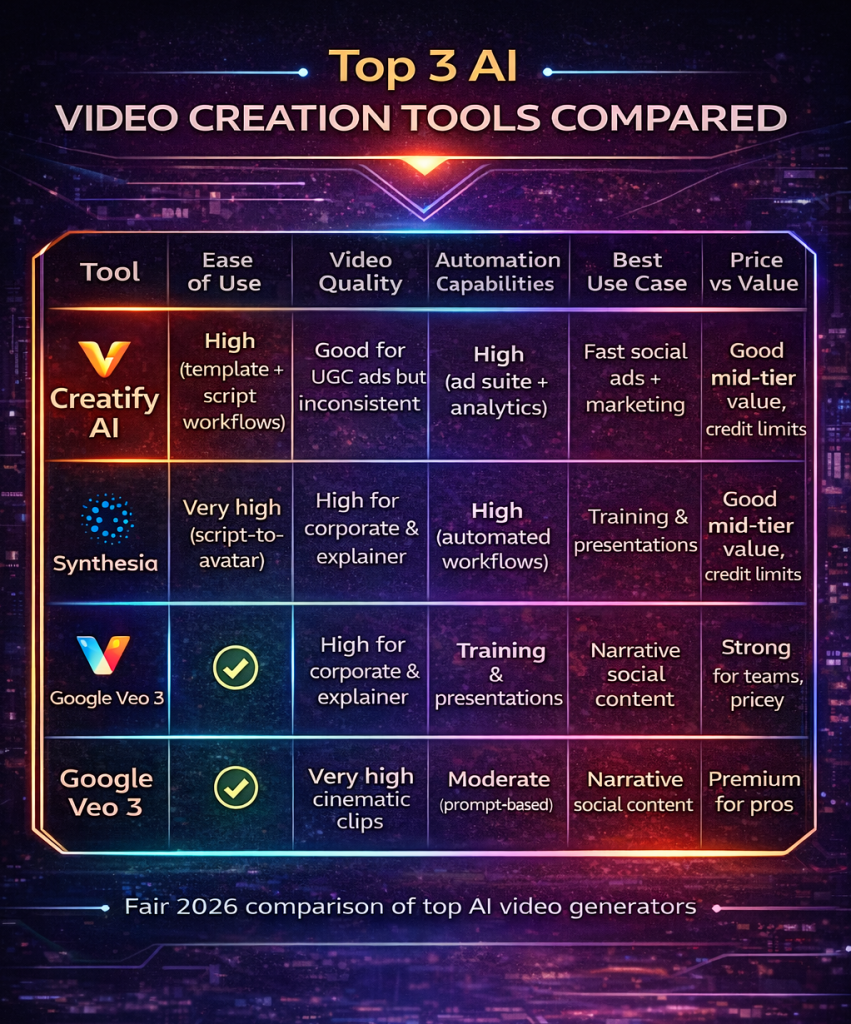
Creatify AI Review Comparison: Top 3 AI Video Creation Tools
| Tool | Ease of Use | Video Quality | Automation Capabilities | Best Use Case | Price vs Value |
|---|---|---|---|---|---|
| Creatify AI | High (template + script workflows) | Good for UGC ads but inconsistent | High (ad suite + analytics) | Fast social ads + marketing | Good mid-tier value, credit limits |
| Synthesia | Very high (script-to-avatar) | High for corporate & explainer | High (automated workflows) | Training & presentations | Strong for teams, pricey |
| Google Veo 3 | Moderate complexity | Very high cinematic clips | Moderate (prompt-based) | Narrative social content | Premium for pros |
Creatify AI Review: Final Verdict
Creatify AI positions itself as more than just a basic video generator — it functions as an ad creative suite built around automation, structured templates, and performance-oriented data insights. Rather than focusing on cinematic storytelling or advanced editing capabilities, the platform is clearly designed to support high-output marketing environments. Its core strength lies in helping teams move quickly from concept to deployable ad creative without getting stuck in long production cycles.
For marketers and ecommerce teams aiming to mass-produce social videos and test multiple ad variations in short timeframes, Creatify delivers a workflow that is both fast and scalable. The ability to transform product messaging into ready-to-run video formats reduces dependency on external editors and shortens turnaround time significantly. In paid media ecosystems where creative fatigue directly impacts performance, this speed can translate into measurable competitive advantage.
That said, the platform is not without trade-offs. Quality can vary depending on the inputs and templates selected, and some outputs may require refinement before reaching a polished brand standard. The credit-based pricing model also requires careful usage planning, especially for teams producing content at high volume. Additionally, reports of customer service limitations suggest that users may need to rely more on self-guided optimization rather than hands-on support.
Overall, Creatify AI is best approached with realistic expectations. It excels at delivering speed, volume, and structured ad experimentation. However, it should not be viewed as a replacement for deep manual editing, high-end motion design, or cinematic storytelling. When used strategically within a performance marketing framework, it can be a powerful efficiency tool — but it is not a full-scale creative studio in a box.

The Future of AI Video Creation
Learn How to Create AI Video Fast an Easy,
If you want a step-by-step guide to create AI videos fast — without learning 50 complicated tools — download the free PDF below and simplify your entire workflow.
Download the free guide:
How to Create AI Videos FAST Without Learning 50 Complicated Tools