
Vidnoz AI Review 2026: Introduction
Vidnoz AI is a cloud-based platform designed to allow anyone — from social media creators to educators and business teams — to produce professional-looking videos without cameras, actors, or traditional editing software. It combines a suite of AI-powered capabilities including text-to-video, image-to-video, AI avatars, multilingual voices, and automated editing tools that promise studio-style video in minutes.
Launched with a freemium model that includes a generous free tier and scalable paid plans, Vidnoz positions itself as an “all-in-one” solution for video creation needs — from marketing videos and training content to social clips and product promos. But beyond the marketing claims, how does the tool perform in real practical workflows? This review cuts through the noise to explore what Vidnoz actually does, where it excels, and where it falls short in 2026.
Vidnoz is best suited for creators and teams looking to build talking avatar videos, multilingual content, and quick social media assets without deep production skills. It is not ideal for users needing heavy editing precision, cinematic execution, or offline workflows.

What Vidnoz AI Video Tool Does Best
Vidnoz’s strength lies in its breadth of features coupled with ease-of-use. The platform lets users generate videos from text scripts, static images, and uploaded video footage, and includes a vast library of AI avatars and voices in over 140 languages.
Vidnoz AI Key capabilities include:
• AI Avatars with natural expressions and gestures that serve as on-screen presenters.
• Text-to-video generation and scene creation from written prompts.
• Image-to-video transforms that animate still images.
• One-click video translation and auto-captioning across multiple languages.
• Extensive video templates and editing tools including background remover and basic transitions.
This combination makes Vidnoz particularly effective for content creators who need to generate consistent, professional communication assets without a production team.
Vidnoz AI Key Features Explained
Vast Avatar and Voice Library
Vidnoz includes over 1,800+ AI avatars and 2,660+ voices in multiple languages and accents, allowing users to craft videos that feel personalized and globally relevant. Avatars can express natural gestures and lip-sync to dialogue, making them suitable for spokesperson-style content.
Text Narratives to Video
Whether starting from a script or a prompt, Vidnoz can convert written content into a full video sequence with spoken narration, motion avatars, and scene transitions — all within a fraction of the time required by traditional video editors.
AI Translation and Localization
Vidnoz’s built-in video translation tools automatically translate dialogue and subtitles into over 135 languages with adaptive lip-sync and speed adjustments. This makes it valuable for global marketing, training, and educational content distribution.
Collaboration and Brand Management
Higher-tier plans unlock team collaboration features, branded video pages, analytics, and enterprise integrations (like SAML/SSO and API access) — facilitating usage in corporate environments and larger teams.
Vidnoz AI Review: Pros and Cons
Pros
• Beginner-friendly and intuitive interface: Users can start generating videos within minutes, with no steep learning curve.
• Large library of avatars, templates, and voices: A diverse asset base speeds workflow and reduces content repetition.
• Multilingual support and translation: Excellent for creating localized video content for global audiences.
• Free tier available: A generous free plan lets users test features before committing.
• One-click translation and subtitles: Simplifies global publishing workflows.
• Commercial licensing included on paid plans: Videos can be used for monetization and client projects.
Cons
• Free tier limitations: Watermarks, daily video caps, and low resolution on the free plan make it impractical for professional publishing without upgrading.
• Complex pricing with credits: Beyond basic subscription minutes, advanced features may consume credits, complicating planning.
• Quality inconsistency: Some user reports note that output quality—especially avatar movements and voice realism—can vary significantly.
• Customer support concerns: Mixed reviews exist around responsiveness and billing issues.
• Limited advanced editing: Users seeking granular control over video sequencing or effects may find built-in tools insufficient.
Who Should Use This Tool
Vidnoz is best for:
• Small business owners and marketers who need quick promo, training, and explainer videos without a production team.
For small businesses operating without in-house videographers or editors, producing professional-looking video content can feel out of reach. Vidnoz lowers that barrier by allowing users to generate spokesperson-style videos, product explainers, onboarding materials, and promotional messages without technical editing skills. Instead of coordinating shoots, managing scripts manually, or outsourcing production, business owners can convert written content into structured video assets in a fraction of the time. This makes it particularly useful for service providers, local businesses, SaaS startups, and consultants who need consistent video communication but lack the budget or resources for traditional production.
• Educators and trainers creating multilingual instructional content.
Vidnoz becomes especially powerful in educational environments where clarity and language accessibility are priorities. Trainers, course creators, and corporate learning teams can transform lessons into avatar-led video modules quickly. Its multilingual capabilities allow content to be localized for different regions without reshooting or re-recording entire sessions. This is valuable for global companies, online academies, and coaching businesses that serve diverse audiences. Instead of hiring multiple voice actors or presenters, educators can maintain consistency across languages while scaling their instructional library efficiently.
• Social media creators needing consistent, spoken-avatar content at scale.
For creators who rely on talking-head style content but prefer not to appear on camera — or need to produce content more frequently than filming allows — Vidnoz offers a scalable alternative. Avatar-based videos provide visual presence and voice delivery without requiring daily recording sessions. This enables consistent publishing schedules across platforms such as YouTube, LinkedIn, or short-form video channels. While it may not replace authentic personality-driven content, it supports creators who prioritize structure, efficiency, and repeatable formats over spontaneous on-camera performance.
• Teams and agencies that require collaboration, branded assets, and translation workflows.
Marketing teams and agencies managing multiple clients often need structured workflows, shared brand kits, and the ability to localize content quickly. Vidnoz supports collaborative environments where multiple stakeholders can contribute to scripting, review, and distribution. The ability to maintain brand consistency while adapting messaging across languages or markets makes it practical for agencies handling international campaigns. Instead of rebuilding videos from scratch for each variation, teams can reuse templates and adapt messaging systematically.
Vidnoz is not ideal for:
• Users needing heavy timeline editing or cinematic storytelling.
Vidnoz is built for efficiency and structured avatar-based communication, not for complex post-production work. Creators who require detailed timeline editing, layered motion graphics, advanced transitions, or cinematic storytelling techniques may find the platform limiting. Narrative-driven content, film-style projects, or visually dynamic brand campaigns typically demand more granular control than template-based systems can provide.
• Offline workflows or creators with strict privacy/security requirements.
As a cloud-based platform, Vidnoz depends on online workflows and server-based processing. Organizations with strict data governance policies or creators working in highly sensitive industries may prefer tools that allow full offline control. While cloud systems improve accessibility and collaboration, they may not align with environments where privacy compliance, internal hosting, or restricted data sharing are mandatory.
In summary, Vidnoz is strongest in structured, scalable communication use cases — especially where multilingual delivery, avatar-based presentation, and fast production matter more than cinematic control.
Vidnoz AI Pricing, Plans and Limitations
Vidnoz offers a freemium model plus paid subscriptions with increasing features and quotas:
• Free Plan: Basic access with daily video limits, watermark, 720p export, and essential avatars/voices.
• Starter Plan (~$19.99–26.99/mo): Removes watermark, 1080p export, more avatars and voice options, and higher quotas.
• Business Plan (~$56.99/mo): Adds voice cloning, brand kit, team collaboration, translation tools, and priority generation.
• Enterprise Plan: Custom pricing with advanced support, dedicated infrastructure, and API access.
Limitations:
• Free tier restrictions make it primarily a test environment before upgrading.
• Credits for advanced features and avatar extras add complexity.
• High-volume creators may need enterprise pricing.
Vidnoz AI Real Use Case Examples
• Vidnoz AI becomes significantly more powerful when you stop looking at it as a “video generator” and start viewing it as a scalable communication tool. Its real strength lies in speed, multilingual support, and avatar-based delivery — making it ideal for businesses that need structured video output without traditional production costs. Below are practical, real-world applications where Vidnoz AI can create measurable impact.
Marketing Campaign Clips: Generate Product Explainer Videos with Talking Avatars in Multiple Languages
For marketing teams, speed and localization are everything. Vidnoz AI allows brands to create product explainer videos using AI avatars that present key features, benefits, and calls-to-action in a professional format. Instead of hiring actors, booking studio time, and producing multiple versions for different markets, businesses can generate localized versions of the same campaign in various languages within minutes.
This is especially useful for SaaS companies, e-commerce brands, and global startups. A single product launch can be adapted for English, Spanish, German, or Asian markets without rebuilding the entire video from scratch. The avatar format adds a human presence without requiring on-camera performance, and the scripted structure ensures message consistency across regions. For paid ads, landing pages, or email funnels, these explainers can significantly increase clarity and conversion rates while keeping production lean.
Training & LMS Content: Use Avatars and Translation to Produce Internal Training Videos Quickly
Corporate training is often slow and expensive to produce, especially when updates are required. Vidnoz AI streamlines this process by enabling companies to generate structured training modules using avatar presenters and voiceovers. HR teams can create onboarding videos, compliance training, product tutorials, or internal announcements without filming live instructors.
One of the most valuable aspects here is scalability. If a policy changes, you update the script and regenerate the video — no reshoots necessary. Additionally, translation capabilities allow organizations with international teams to deliver consistent messaging across multiple languages, improving clarity and alignment.
For LMS platforms, this reduces friction dramatically. Instead of static PDF documents, companies can deliver engaging video-based learning experiences that feel professional while being cost-efficient.
Social Media Engagement: Create Short Promo Reels or Personality-Driven Content for Platforms Like Instagram and TikTok
Short-form video thrives on consistency and volume. Vidnoz AI can help marketers and creators produce short promo clips featuring avatar presenters that deliver quick tips, product highlights, or announcements formatted for vertical platforms.
While social media audiences value authenticity, structured promotional content still performs well when it communicates value clearly. For example, a brand can create a weekly “feature highlight” series where an avatar explains one benefit in under 30 seconds. This format is especially useful for businesses that prefer not to appear on camera but still want a recognizable “face” delivering the message.
When paired with captions, engaging hooks, and strong calls-to-action, these short clips can drive traffic, generate leads, and reinforce brand positioning without requiring full-scale video production.
Product Demo Narratives: Animate Product Walkthroughs with Voiceovers and On-Screen Avatars
Product demos are essential for conversion, but many small businesses struggle with producing clear walkthrough videos. Vidnoz AI simplifies this by combining scripted narration with on-screen avatars and visual overlays.
Instead of recording live demonstrations repeatedly, businesses can create structured demo narratives that explain how a product works step by step. For software tools, this might include feature explanations with supporting visuals. For physical products, it can involve benefit-driven storytelling supported by images or animation.
The avatar acts as a guide, maintaining viewer attention while delivering information in a polished, digestible format. This approach works particularly well for landing pages, sales funnels, investor presentations, and onboarding sequences.
In each of these use cases, the core advantage remains the same: reduced production cost, faster turnaround time, and scalable video communication without traditional filming constraints.
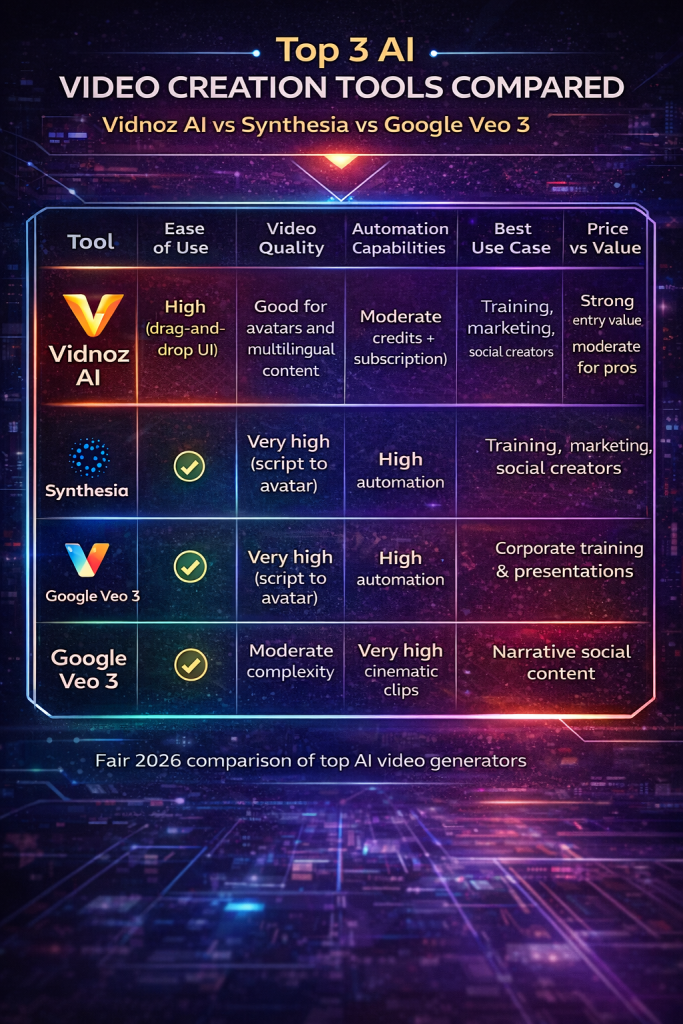
Vidnoz AI Review Comparison: Top 3 AI Video Creation Tools
| Tool | Ease of Use | Video Quality | Automation Capabilities | Best Use Case | Price vs Value |
|---|---|---|---|---|---|
| Vidnoz AI | High (drag-and-drop UI) | Good for avatars and multilingual content | Moderate (credits + subscription) | Training, marketing, social creators | Strong entry value, moderate for pros |
| Synthesia | Very high (script to avatar) | High for professional communications | High automation | Corporate training & presentations | Good for teams, pricey for solo users |
| Google Veo 3 | Moderate complexity | Very high cinematic clips | Moderate automation | Narrative social content | Premium value for advanced creators |
Common Mistakes to Avoid When Using Vidnoz AI
Even though Vidnoz AI is designed to be beginner-friendly, many new users fail to get good results simply because they approach the platform with the wrong expectations or workflow. Understanding the most common mistakes can save time, frustration, and wasted credits.
One of the biggest errors is trying to treat Vidnoz like a traditional video editor. This tool is not meant for complex timeline editing, heavy motion graphics, or cinematic storytelling. Users who upload raw footage expecting Hollywood-level control often end up disappointed. Vidnoz works best when you embrace its core strength: structured, template-based, avatar-driven content.
Another frequent mistake is writing poor scripts. Because Vidnoz relies heavily on AI voices and avatars, the final video quality depends largely on the input text. Long, complicated sentences, unclear phrasing, or overly technical language will make the narration feel robotic and unnatural. The best results come from short, conversational scripts designed specifically for AI delivery.
Many beginners also ignore aspect ratios and platform formats. Creating a horizontal video for TikTok or a vertical video for YouTube presentations leads to awkward compositions and poor engagement. Vidnoz provides multiple export formats, but the user must plan the video layout from the beginning.
A practical but often overlooked problem is overusing animations and effects. Since Vidnoz offers many transitions and visual options, new users tend to apply too many of them at once. This usually results in videos that look busy and unprofessional. Simple, clean designs almost always perform better.
Finally, relying too much on the free plan is another common trap. The free tier is excellent for testing, but serious creators need to upgrade. Watermarks, low resolution, and limited minutes make it impossible to build a consistent professional workflow without moving to a paid subscription.
Avoiding these mistakes makes a massive difference in how effective Vidnoz AI can be for real projects.
Workflow Tips to Get Better Results with Vidnoz AI
To get the most value out of Vidnoz AI, it helps to follow a structured workflow rather than jumping straight into random video generation. The platform works best when used strategically instead of experimentally.
Start by defining the purpose of your video before opening the editor. Decide whether the goal is marketing, education, social media engagement, or internal communication. Each objective requires a different tone, avatar style, and pacing. Vidnoz performs much better when the creator has a clear direction.
Next, prepare your script outside the platform. Write and refine your text in a document first, focusing on clarity and natural speech patterns. Break the content into short sections that can be easily turned into scenes. Clean input equals clean output.
Choose avatars and voices carefully. Not every avatar fits every type of video. Corporate training content usually looks better with professional, neutral avatars, while social media videos benefit from more casual and energetic characters. Matching the right voice style to the topic is just as important.
Use templates as a starting point instead of building from scratch. Vidnoz includes hundreds of pre-designed layouts for presentations, ads, and tutorials. Customizing an existing template is much faster and usually produces better visual results than creating everything manually.
Preview frequently and make small adjustments. Rather than generating a full video at once, test short segments to ensure lip-sync, pacing, and scene transitions look correct. This prevents wasting credits on large renders that need to be redone.
Finally, treat Vidnoz as part of a larger content ecosystem. Many creators get the best outcomes by combining it with external tools for scriptwriting, thumbnail design, and final editing. Vidnoz excels at fast AI generation, but a polished workflow often includes additional finishing steps.
Following these practices turns Vidnoz from a simple novelty tool into a reliable, repeatable video production system.
Vidnoz AI Review: Final Verdict
Vidnoz AI stands out as a versatile and accessible AI video generator designed for speed, clarity, and usability. Its strengths are immediately noticeable in areas like avatar variety, multilingual voice support, structured templates, and rapid rendering. For creators who prioritize efficiency over intricate editing, the platform removes many of the technical barriers traditionally associated with video production. You can move from script to publishable video in a short time, which makes it particularly attractive for marketers, educators, and small teams operating under tight deadlines.
One of Vidnoz AI’s most compelling advantages is its generous free tier. This lowers the entry barrier for beginners, solo creators, and budget-conscious users who want to experiment before committing financially. It allows users to test workflows, explore avatar options, and understand the platform’s structure without immediate pressure. For startups and early-stage creators, that accessibility can make a meaningful difference.
At the paid level, Vidnoz becomes more practical for teams. Branding features, collaborative workflows, and expanded voice and language capabilities support structured business use. Companies that need consistent internal training videos, onboarding materials, or multilingual marketing assets will likely find the upgrade worthwhile. The ability to replicate formats and maintain consistency across projects enhances productivity in structured environments.
That said, Vidnoz AI is not without limitations. Output quality can vary depending on avatar selection, script complexity, and template choice. While results are often solid for instructional or promotional content, they may not consistently meet the expectations of creators seeking high-end polish. Additionally, the credit-based pricing structure layered onto subscription plans can feel confusing for users who require predictable budgeting at scale.
Ultimately, Vidnoz AI is not a one-size-fits-all production powerhouse. It excels in structured communication scenarios: social media updates, marketing explainers, product walkthroughs, and corporate training. However, creators aiming for cinematic storytelling, advanced motion graphics, or deep creative control may find it restrictive.
In practical terms, Vidnoz works best when aligned with its strengths. Used strategically, it can dramatically accelerate video output and simplify multilingual communication. Used with unrealistic expectations of film-level customization, it may disappoint. For fast, scalable, avatar-driven content, it remains a highly practical tool in the 2026 AI video landscape.
Author’s Note:I research and evaluate AI video tools from the perspective of a digital entrepreneur who builds and monetizes content sites across multiple niches. My focus is always practical: does this tool fit into a real production workflow, what does it actually cost at scale, and does it deliver value for creators building long-term online assets. This review reflects that analytical approach, combined with direct exploration of the platform.
Learn How to Create AI Video Fast an Easy,
If you want a step-by-step guide to create AI videos fast — without learning 50 complicated tools — download the free PDF below and simplify your entire workflow.
Download the free guide:
How to Create AI Videos FAST Without Learning 50 Complicated Tools