The Best AI Tools That Make Videos in 2026
The number of AI tools available for video creation has grown dramatically over the past two years. What started as a handful of experimental platforms has become a full ecosystem of specialized software covering every stage of the production process, from the first line of a script to the final exported file ready for upload.
For creators, marketers, and online entrepreneurs, this is genuinely good news. It means that professional-quality video production is no longer gated behind expensive equipment, technical expertise, or large teams. A single person with the right combination of tools can now produce content that competes with videos that would have required a full production crew just a few years ago.
The challenge, however, is that with so many options available it has become difficult to know which tools are actually worth your time and money. Not every AI video platform delivers what it promises, and the wrong choice can cost you hours of frustration and weeks of wasted effort.
This guide cuts through the noise. It covers the best AI tools for video creation in 2026, organized by production stage, with honest assessments of what each tool does well, where it falls short, and who it is best suited for. Whether you are building a YouTube channel, producing marketing content, or creating educational videos, you will find a practical set of recommendations here that you can act on immediately.
How to Think About AI Video Tools
Before diving into specific platforms, it helps to understand how the AI video creation ecosystem is structured. Most creators make the mistake of looking for a single tool that does everything. In reality, the best results come from combining specialized tools that each excel at one specific stage of the workflow.
Think of your AI video production system as a pipeline with five distinct stages. The first stage is content planning and research, where you identify what to make and why. The second is scriptwriting, where the structure and narration of the video take shape. The third is voiceover production, where the script becomes an audio track. The fourth is visual assembly, where footage, images, and text overlays are combined with the narration. The fifth is optimization and distribution, where the finished video is prepared for maximum visibility on the platforms where it will be published.
Each of these stages has tools that are purpose-built to handle it well. Understanding this structure helps you evaluate tools based on what they actually need to do in your workflow, rather than which platform has the most impressive marketing page.

The Best AI Tools for Content Planning and Research
VidIQ
VidIQ is one of the most widely used tools for YouTube-specific content research. Its AI-powered features analyze search trends, identify high-opportunity keywords, and provide data on what topics are gaining traction in your niche. The daily ideas feature generates a personalized list of video topic suggestions based on your channel’s existing content and audience behavior.
For creators building an automated video channel, VidIQ is valuable at the planning stage because it connects topic selection directly to search data. Rather than guessing what your audience wants to watch, you are making decisions based on real evidence of what they are actively searching for.
VidIQ offers a free tier with limited features and paid plans that unlock the full AI-powered research suite. For a new channel, the free plan covers the basics. As your channel grows and you need more granular data, the paid tier becomes worth the investment.
TubeBuddy
TubeBuddy operates in the same space as VidIQ and the two are frequently compared. TubeBuddy’s strength is in its keyword research and title optimization tools, which integrate directly into the YouTube Studio interface as a browser extension. This means you can see keyword data and optimization suggestions without leaving the platform where you are actually uploading your content.
The AI-powered title generator and tag suggestions are particularly useful for beginners who are still developing their intuition for what makes a video title perform well. TubeBuddy offers a free tier and several paid plans, and like VidIQ it rewards creators who use it consistently over time as the data it provides becomes more tailored to your specific channel.
ChatGPT and Claude for Research
General-purpose AI assistants are underutilized as research tools for video creators. Both ChatGPT and Claude can help you map out a content strategy for an entire month, identify the questions your audience is likely asking about a specific topic, analyze the structure of successful videos in your niche, and generate dozens of title variations for a single video concept.
Used at the planning stage before any production work begins, these tools can dramatically reduce the time you spend figuring out what to make and why, freeing up your energy for the execution stages where the actual content gets built.
The Best AI Tools for Scriptwriting
ChatGPT
ChatGPT remains one of the most capable and widely accessible tools for video scriptwriting. With a well-structured prompt that includes your topic, target audience, key points, and desired tone, it can generate a complete, structured video script in under two minutes. The output quality has improved significantly with recent model updates, and the conversational interface makes it easy to refine and iterate on the initial draft.
For creators who produce high volumes of content, the ability to generate script drafts quickly and refine them through follow-up prompts makes ChatGPT one of the highest-leverage tools in the entire workflow. The free tier provides enough capability for most content production needs, and the paid plan unlocks faster response times and access to the most capable models.
Claude
Claude is increasingly used by content creators as a scriptwriting alternative to ChatGPT, particularly for longer-form content where maintaining a consistent tone and structure across a full script is important. Claude tends to produce output that reads more naturally as spoken narration, which matters significantly when the script is going to be converted into voiceover audio.
For video scripts specifically, Claude’s ability to follow detailed formatting instructions and maintain a consistent voice throughout a long document makes it a strong choice for creators who have developed specific style guidelines for their channel.
Jasper
Jasper is a dedicated AI writing platform with templates built specifically for video content, including video scripts, YouTube descriptions, hooks, and calls to action. Unlike general-purpose AI assistants, Jasper’s interface is structured around specific content formats, which makes it faster to use for creators who produce the same types of content repeatedly.
The video script template in Jasper prompts you for key information about your topic and audience and then generates a structured script with sections already organized in a logical flow. For beginners who are still learning how to structure effective video scripts, this guided approach can be more helpful than the open-ended interface of a general AI assistant.
The Best AI Tools for Voiceover Production
ElevenLabs
ElevenLabs is widely considered the leading platform for AI voice generation in 2026. The quality of its voices has reached a level where the output is genuinely difficult to distinguish from human narration in a normal listening context. The platform offers an extensive library of voices across different genders, ages, accents, and speaking styles, and its voice cloning feature allows you to create a custom AI voice based on a sample recording.
For faceless video channels where the narration is the primary way viewers connect with the content, the voice quality that ElevenLabs produces is a meaningful competitive advantage. A channel with a distinctive, natural-sounding AI voice will hold viewer attention more effectively than one using a clearly synthetic narrator.
ElevenLabs offers a free plan with a monthly character limit that is sufficient for testing but will likely require an upgrade for channels producing content at any meaningful volume. The paid plans are reasonably priced relative to the quality of output they deliver.
Murf
Murf is a strong alternative to ElevenLabs, particularly for creators who want more direct control over how the narration sounds. The platform allows you to adjust emphasis, pacing, and pitch at the word and sentence level within a clean visual interface, which makes it easier to fine-tune the delivery of specific lines without regenerating the entire audio track.
Murf’s voice library is somewhat smaller than ElevenLabs but covers the most commonly needed styles well. Its interface is more beginner-friendly, which makes it a good starting point for creators who are new to AI voiceover production and want a tool that is easy to learn quickly.
Descript
Descript occupies a unique position in the voiceover and editing space because it combines audio and video editing with AI voice generation in a single platform. Its most distinctive feature is the ability to edit audio and video by editing the transcript text, which means you can remove a section of narration simply by deleting the corresponding text rather than manually cutting the audio file.
For creators who want to streamline the post-production stage of their workflow, Descript’s combination of editing capabilities and AI voice features makes it one of the most efficient tools available. It is particularly well suited for creators who produce interview-style or narration-heavy content where editing the spoken word is the primary post-production task.
The Best AI Tools for Visual Assembly and Video Generation
Pictory
Pictory is one of the most practical tools available for creators who want to go from a script or article directly to a finished video with minimal manual work. The platform’s AI analyzes your text content, selects relevant footage from its stock library, matches the visuals to the timing of your narration, adds captions automatically, and assembles a complete video sequence ready for review and export.
The output is not perfect out of the box. Some of the automated visual selections will need to be replaced manually, and the default caption styling may need adjustment to match your channel’s aesthetic. But the time savings compared to assembling a video manually are substantial, and for creators producing high volumes of evergreen content, Pictory’s workflow makes consistent output genuinely achievable.
InVideo
InVideo offers a similar automated video assembly workflow to Pictory but with a more flexible editing interface and a larger template library. Its AI-powered script-to-video feature can take a topic or a script and generate a complete video with footage, text overlays, transitions, and background music selected automatically.
InVideo is particularly strong for creators who want more design control than Pictory’s automated approach provides. The platform’s template system allows you to establish a consistent visual style for your channel that carries across all your videos without requiring manual design work for each one.
Synthesia
Synthesia takes a different approach to AI video creation by generating videos featuring realistic AI avatars that deliver your script as if they were a human presenter on screen. Rather than using stock footage or abstract visuals, Synthesia videos look like a person speaking directly to camera, which can be more effective for certain types of content, particularly educational and business-focused material where a presenter adds authority and trust.
The platform offers a growing library of AI avatars in different styles and backgrounds, and the lip-sync quality of recent versions is noticeably more natural than earlier iterations. For creators who want the visual credibility of an on-camera presenter without actually recording themselves, Synthesia offers a compelling solution.
Runway ML
Runway ML represents the more advanced end of the AI video generation spectrum. Rather than assembling existing footage, Runway can generate original video clips from text prompts, extend existing footage, remove backgrounds in motion, and apply cinematic visual effects using AI. The results are not always predictable, but when they work they produce visuals that simply cannot be obtained from a stock footage library.
For creators who want a distinctive visual identity that sets their channel apart from others using the same stock clips, Runway ML opens up creative possibilities that were not accessible to independent creators even two years ago. The learning curve is steeper than platforms like Pictory or InVideo, but the ceiling for what you can produce is significantly higher.
HeyGen
HeyGen focuses on AI avatar video creation with a strong emphasis on multilingual capability. The platform can generate videos in which an AI avatar speaks in multiple languages with natural-sounding lip sync, which makes it particularly valuable for creators who want to reach audiences across different language markets without producing separate recordings for each one.
For content creators and businesses with an international audience, HeyGen’s translation and localization features represent a significant production efficiency that would otherwise require professional translators and recording sessions in multiple languages.
The Best AI Tools for Thumbnails and Channel Design
Canva
Canva remains the most practical design tool for video creators who are not professional designers. Its AI-powered features include a text-to-image generator for creating custom visual elements, a background remover, a magic resize tool that adapts designs to different platform specifications automatically, and an AI writing assistant for generating thumbnail text and video descriptions.
For YouTube thumbnails specifically, Canva’s template library includes hundreds of designs optimized for the platform’s visual environment. Starting from a template and customizing it for your specific video is significantly faster than designing from scratch, and the results are consistently professional in appearance.
Adobe Firefly
Adobe Firefly is Adobe’s AI image generation platform, integrated into the Creative Cloud ecosystem. For creators who are already using Adobe tools, Firefly provides a native way to generate custom visual elements, backgrounds, and graphic assets that can be used in thumbnails, channel art, and promotional graphics.
The quality of Firefly’s image generation is consistently high, and the integration with Photoshop and Illustrator means that generated assets can be refined with full professional editing capabilities. For creators who want custom visuals that are not available in any stock library, Firefly is one of the strongest options available.
The Best AI Tools for Publishing and Optimization
YouTube Studio with AI Features
YouTube’s own Studio platform has incorporated AI-powered features that are worth understanding for any creator publishing on the platform. Automatic caption generation, AI-suggested chapter markers, and performance analytics that identify where viewer drop-off occurs are all built into the platform at no additional cost.
Using these native features in combination with third-party tools like TubeBuddy and VidIQ creates an optimization layer that helps each video perform as well as possible from the moment it is published.
Metricool
Metricool is a social media management and analytics platform with AI-powered scheduling and content planning features. For creators who are distributing their video content across multiple platforms beyond YouTube, including Instagram, TikTok, and Facebook, Metricool provides a centralized dashboard for scheduling, publishing, and tracking performance across all channels simultaneously.
The AI scheduling feature analyzes your audience’s activity patterns and recommends the optimal times to publish each piece of content for maximum reach, which removes one more decision from the production workflow and replaces it with data-driven automation.
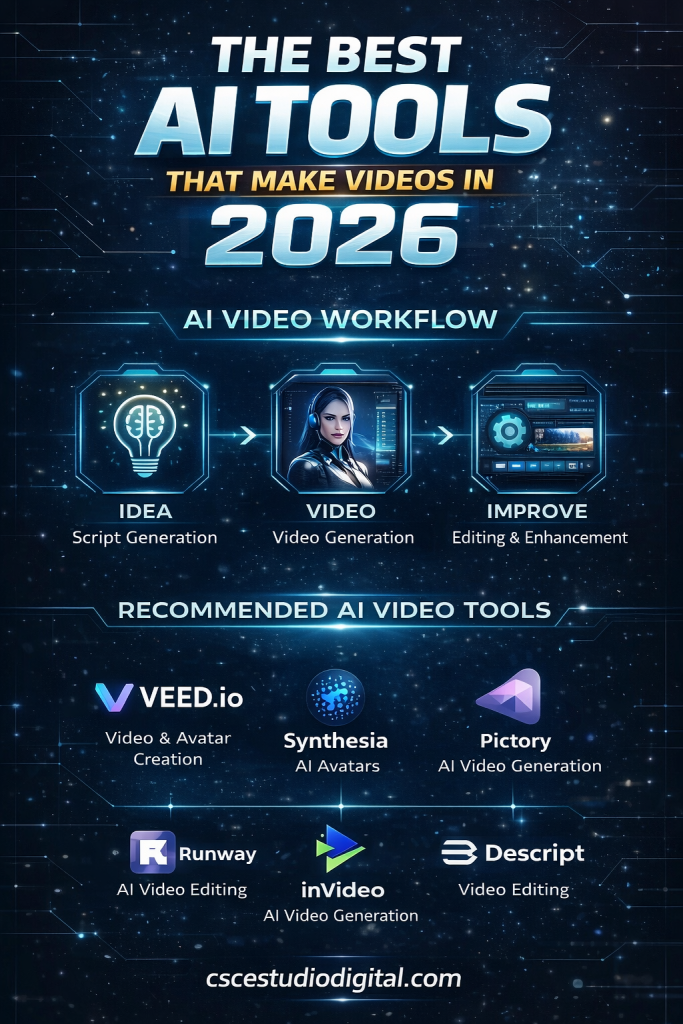
Building Your AI Video Stack in 2026
The right combination of tools depends on your specific goals, your budget, and the type of content you are producing. For most creators building an automated video channel from scratch, a practical starting stack looks like this.
For research and planning, VidIQ or TubeBuddy combined with ChatGPT or Claude covers everything you need to identify topics and plan your content calendar. For scripting, ChatGPT or Claude with a well-developed prompt template produces strong results consistently. For voiceover, ElevenLabs is the strongest choice for quality, with Murf as a user-friendly alternative. For visual assembly, Pictory or InVideo handles the full workflow efficiently. For design, Canva covers thumbnails and channel art without requiring any design experience.
This stack can be assembled with a combination of free tiers and low-cost plans, making it accessible to creators at every budget level. As your channel grows and your production volume increases, you can layer in more specialized tools like Runway ML for original footage generation or Synthesia for AI presenter videos as the results justify the investment.
The key is not to build the most sophisticated stack possible from day one. It is to build a functional system that you can execute consistently, and then improve it incrementally based on what the data tells you is working.
Conclusion
The AI video tools available in 2026 have made professional-quality video production accessible to anyone willing to learn how to use them. The barrier is no longer equipment, budget, or technical skill. It is the knowledge of which tools to use, how to combine them into a coherent workflow, and how to maintain the consistency that builds an audience over time.
The creators who are building the most successful AI video channels right now are not necessarily the ones with the most advanced tools. They are the ones who have built reliable systems and execute them week after week without stopping.
If you are serious about taking this beyond individual videos and building a content operation that produces results at scale, exploring how these tools can be integrated into a fully automated content system is the natural next step. That level of automation is what separates creators who are always catching up from those who are consistently ahead.
Learn How to Create AI Videos Fast an Easy,
If you want a step-by-step guide to create AI videos fast — without learning 50 complicated tools — download the free PDF below and simplify your entire workflow.