
AI Video Creation for Beginners: A Complete Practical Guide
Not long ago, producing a professional-looking video required a camera, lighting equipment, editing software, and enough technical skill to tie it all together. For most people without a media background, that combination of cost and complexity was enough to make video creation feel out of reach. The result was that video content remained the territory of people with budgets, teams, or years of practice behind them.
That barrier no longer exists in the same way.
AI video creation tools have fundamentally changed what is possible for someone starting from zero. Today, a beginner with no camera, no editing experience, and no technical background can produce a complete, professional-quality video using a combination of AI tools that handle the writing, the visuals, the narration, and the final assembly. The process is not magic, and it does require learning a system, but the learning curve is significantly shorter than anything that existed before.
This guide is designed for people who are genuinely starting from the beginning. It covers what AI video creation actually is, why it matters right now, and exactly how to go from a blank screen to a finished video using tools that are accessible and affordable in 2026.
What AI Video Creation Actually Means
Before getting into the practical steps, it helps to have a clear picture of what AI video creation means in a real workflow context, because the term gets used in different ways depending on who is talking about it.
At its most basic level, AI video creation means using artificial intelligence tools to handle one or more stages of the video production process. That could mean using an AI writing tool to generate a script, an AI voice generator to produce narration, an AI visual platform to assemble footage, or a combination of all three working together in a connected workflow.
The goal is not to replace human creativity entirely. The goal is to remove the technical bottlenecks that have traditionally slowed down or blocked content production. A beginner using AI tools is not pretending to be a professional video editor. They are building a system where the AI handles the execution while the human provides the direction, the topic selection, and the quality control.
This distinction matters because it shapes how you approach the learning process. You are not trying to learn video editing. You are learning how to direct an AI-powered production system. That is a much more accessible skill, and it is one that translates directly into real output from the very first session.
Why 2026 Is the Right Time to Start
The timing of when you enter a new space matters. Starting too early means dealing with immature tools and unreliable results. Starting too late means competing in a saturated market where the early movers have already established their advantage.
Right now, AI video creation sits in a window that favors new entrants. The tools have matured enough to produce consistently good results, the cost of access has dropped significantly, and the majority of content creators are still producing video the traditional way. That gap between what is possible with AI and what most creators are actually doing represents a real opportunity for someone willing to build their skills and their system now.
YouTube, for example, is still growing its user base and its demand for content. The platform needs more videos in more niches than currently exist. A beginner who builds an AI-powered video channel today is entering a market that is still far from saturated, armed with production tools that give them capabilities equivalent to a small production team.
The window will not stay open indefinitely. As more creators adopt these tools and more channels using AI content come online, the competitive landscape will shift. The creators who build their systems and their audiences now will be the ones who benefit most from that shift.

The Core Stages of AI Video Production
Every video, regardless of the tools used to make it, passes through the same fundamental stages. Understanding these stages is the foundation of building your workflow.
Stage One: Concept and Research
This is where you decide what your video will be about and what it needs to accomplish. For a beginner, this stage involves choosing a topic that has genuine search demand, identifying what the viewer wants to learn or understand, and defining the key points the video needs to cover.
AI tools can help here in a significant way. By feeding a topic into an AI research tool or a general-purpose AI assistant, you can quickly get an overview of the subtopics worth covering, the questions your audience is likely asking, and the angle that would make your video stand out from existing content on the same subject.
The output of this stage is a clear brief: a topic, a target audience, a list of key points, and an intended video length.
Stage Two: Scriptwriting
With your brief in hand, the next stage is turning those ideas into a structured script. This is where most traditional video creators spend the majority of their preparation time. AI makes it significantly faster.
A well-prompted AI writing tool can generate a complete video script from your brief in minutes. The script will include an opening hook designed to capture attention in the first few seconds, a structured body that covers your key points in a logical sequence, and a closing call to action that directs the viewer to take a next step.
The script is not just narration text. It also serves as the blueprint for the rest of your production process, telling you what visuals you need, where transitions should happen, and how long each section of the video should run.
Stage Three: Voiceover Production
Once the script is ready, the narration track comes next. For a faceless AI video channel, this means generating an AI voice that will read your script in a natural, engaging way.
Modern AI voice generators produce output that holds up well under normal listening conditions. The best platforms offer dozens of voice options across different genders, ages, accents, and speaking styles. You choose the voice that fits your channel’s tone, paste in your script, and generate the audio file.
This stage typically takes between five and fifteen minutes depending on the length of your script and how much adjustment you want to make to the pacing and delivery.
Stage Four: Visual Selection and Assembly
With your narration track ready, the next step is pairing it with visuals. For most beginner AI video channels, this means selecting video clips and images that match the content of each section of the script.
AI video assembly platforms can automate much of this process. You upload your script or narration file and the platform uses AI to identify relevant stock footage, match it to the timing of your audio, add captions, and assemble a complete video sequence. The result is a rough cut that you can then review and refine before exporting.
Stage Five: Final Review and Export
Before publishing, every video needs a final review pass. This is not a full re-edit. It is a quality check where you watch the assembled video once through and look for anything that needs correction. Common issues at this stage include visuals that do not quite match the narration, captions that are slightly off, or sections where the pacing feels too fast or too slow.
Most AI assembly platforms allow you to make these adjustments directly within the tool. Once you are satisfied with the result, you export the final video file and it is ready to upload.
AI Video Creation for Beginners:
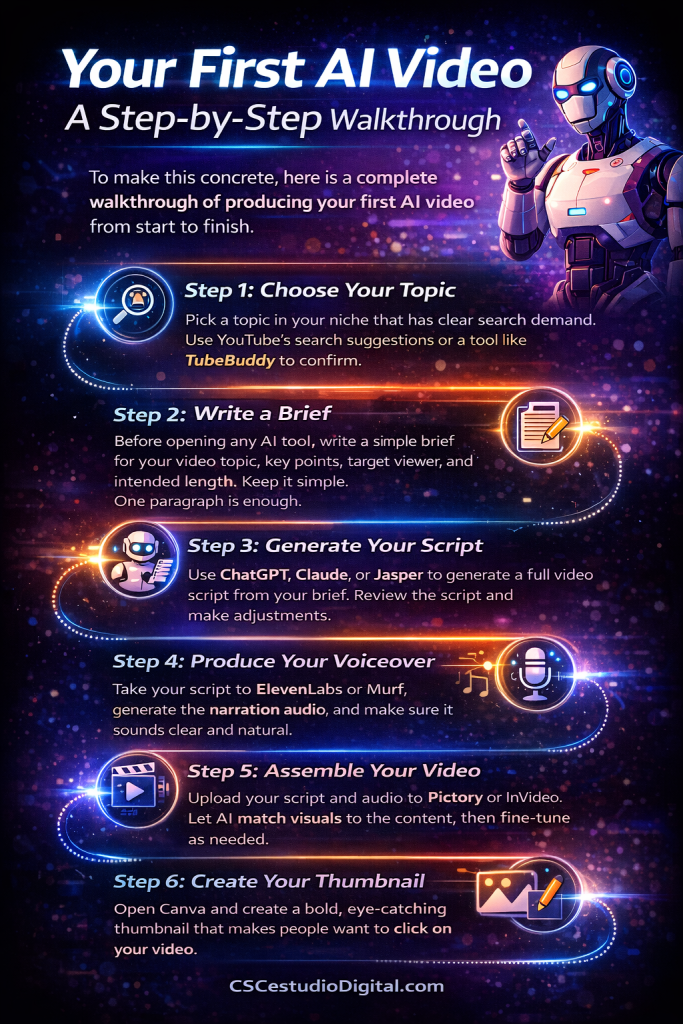
Your First AI Video: A Step-by-Step Walkthrough
To make this concrete, here is a complete walkthrough of producing your first AI video from start to finish.
Step 1: Choose Your Topic
Pick a topic in your niche that has clear search demand. For a beginner, it helps to start with a how-to or explainer format because these have predictable structure and strong search intent. Use YouTube’s search suggestions or a tool like TubeBuddy to confirm that people are actively searching for your topic.
Step 2: Write a Brief
Before opening any AI tool, write a simple brief for your video. It should include the topic, the target viewer, three to five key points you want to cover, and the intended length. Keep it simple. One paragraph is enough.
Step 3: Generate Your Script
Open your AI writing tool of choice, whether that is ChatGPT, Claude, or Jasper, and give it your brief. Ask it to produce a video script with a strong opening hook, structured body sections, and a clear call to action at the end. Review the output, make any adjustments to the tone or content, and save the final version.
Step 4: Produce Your Voiceover
Take your finished script to ElevenLabs or Murf, select a voice that fits your channel’s style, and generate the narration audio. Listen through the full track once to catch any pronunciation errors or unnatural pauses. Most platforms allow you to regenerate specific sections without redoing the entire track.
Step 5: Assemble Your Video
Upload your script and narration file to Pictory or InVideo. Let the platform’s AI match visuals to your content and assemble the initial cut. Review the assembled video and make adjustments where the visuals or timing need correction. Add background music at a low volume if the platform does not add it automatically.
Step 6: Create Your Thumbnail
Open Canva and create a thumbnail that clearly communicates what the video is about. Use a bold title text, a relevant background image, and a color scheme that will stand out in a crowded YouTube feed. Keep the design simple. Thumbnails that try to include too much information tend to underperform.
Step 7: Upload and Optimize
Upload your video to YouTube. Write a description that includes your primary keyword in the first two sentences, covers the main topics of the video in natural language, and ends with a call to action. Add relevant tags using TubeBuddy’s keyword suggestions. Set your thumbnail, add end screens and cards if applicable, and schedule or publish.
Common Mistakes Beginners Make With AI Video Creation
Understanding what not to do is just as valuable as knowing what to do. These are the mistakes that slow down or derail most beginners.
Accepting the first AI output without reviewing it. AI tools produce drafts, not finished work. Every script, voiceover, and visual assembly needs a human review pass before it is ready to publish. Skipping this step leads to content that feels generic or contains errors that undermine your credibility.
Trying to use too many tools at once. Beginners often get overwhelmed by the number of AI tools available and try to incorporate all of them into their workflow before they have mastered any of them. Start with one tool for each stage of the process and add complexity only when you are consistently producing good results with your basic stack.
Choosing a niche without validating demand. Producing excellent videos about a topic that nobody is searching for will not build an audience. Always confirm that there is real search volume behind your topic before investing time in production.
Publishing inconsistently. YouTube’s algorithm rewards channels that publish on a predictable schedule. A beginner who publishes ten videos in two weeks and then nothing for a month will struggle to build momentum. Decide on a publishing frequency you can sustain and stick to it.
Ignoring thumbnails and titles. The best video in the world will not get watched if the thumbnail and title do not make someone want to click. These two elements deserve as much attention as the video itself.
AI Tools Every Beginner Should Know
Building your first AI video workflow does not require spending a lot of money. Here is a practical starter set of tools organized by production stage.
For scripting, ChatGPT or Claude provide strong results with a well-structured prompt and are accessible to anyone. Jasper and Copy.ai offer more content-specific templates if you want more structured output from the start.
For voiceover, ElevenLabs offers the most natural-sounding voices available at an accessible price point. Murf is a strong alternative with a clean interface that beginners find easier to navigate.
For video assembly, Pictory and InVideo both handle the full workflow from script to finished video with minimal manual editing required. Both have beginner-friendly interfaces and tutorial libraries that help new users get up to speed quickly.
For design, Canva covers thumbnail creation, channel art, and social media graphics with a drag-and-drop interface that requires no design experience.
For YouTube optimization, TubeBuddy and VidIQ both offer free tiers with enough features to support a new channel through its early growth stages.
What to Expect in Your First 90 Days
Setting realistic expectations is important for anyone starting a new content channel. Here is an honest picture of what the first three months of an AI video channel typically look like.
In the first month, most of your time goes toward learning the tools and building the workflow. Your early videos will not be your best work, and that is completely normal. The goal in the first month is not to go viral. It is to complete the production cycle from idea to published video as many times as possible so that the process becomes familiar and efficient.
In the second month, you will start to see which videos attract more views than others. This data is valuable feedback. Use it to refine your topic selection and your approach to titles and thumbnails. Continue publishing consistently and start paying attention to your watch time metrics, which tell you whether viewers are staying through the full video or dropping off at a specific point.
By the third month, you will have a functioning workflow, a small but growing library of content, and enough data to make informed decisions about what to produce next. Some channels start seeing meaningful view counts within this timeframe. Others take longer. What matters is that you are building a system that compounds over time, and every video you publish adds to that foundation.
AI Video Creation for Beginners: Conclusion
AI video creation is one of the most accessible content opportunities available to beginners in 2026. The tools exist, the platforms are ready, and the demand for video content continues to grow faster than the supply of quality creators can meet it.
What separates the creators who succeed from those who do not is not talent or technical skill. It is the willingness to build a system, learn from the output, and publish consistently over time. AI handles the production complexity. Your job is to provide the direction, maintain the quality, and keep the workflow moving.
If you are serious about building an automated video content system that can grow into a real income source, the next step is to go beyond individual tools and explore how a complete AI content production system works as a unified workflow. That is where the real leverage is, and it is what allows serious creators to scale their output without scaling their time investment proportionally.
Start with one video. Build the system. Let it grow.
Learn How to Create AI Videos Fast an Easy,
If you want a step-by-step guide to create AI videos fast — without learning 50 complicated tools — download the free PDF below and simplify your entire workflow.